
Information on WAP, the Mobile Internet Service
What is WAP?
WAP stands for Wireless Access Protocol, and is more commonly referred to as "Mobile Internet"
Most of today’s mobile phones, smartphones
and PDAs come with a built in WAP browser. With a WAP browser,
you can access dedicated WAP pages while on the move.
As WAP phones have smaller screens, content is
often fairly basic, so pages are quite efficient and downloaded
fairly quickly.
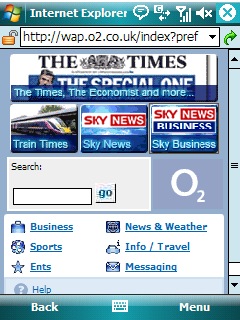
o2’s WAP service on
a Windows Mobile
WAP
is supplied as a service by most mobile phone operators. When WAP launched, it was available from browsers that dialled up a special WAP number. Today, WAP access is available over GPRS, allowing faster browsing via an always-on connection.
With GPRS, you are billed by the amount of data you send. Some UK operators,
notably o2
online,
offer an inclusive GPRS WAP allowance.
This page provides some general links on WAP, setup information for those
in the UK, and answers to commonly-asked questions
Getting WAP
Here’s what you need to get WAP:
- A mobile phone with a WAP browser built-in
- A SIM card that supports data transfer (if in doubt, ask your network operator if your SIM is data-enabled)
- To set up your mobile phone’s data connection to a WAP access point. We list the WAP gateways for the UK on this page. You can connect via dial-up (billed by the minute), or more commonly via GPRS (billed by the megabyte)
Once your mobile it set up correctly, you need to go to your network operator’s WAP homepage to access WAP content.
WAP
tips…
WAP
isn’t the experience many thought it would be – but it can actually be
a very useful tool. There are some common misconceptions about WAP…
as time’s moved on – most of these are now wrong:
| WAP’s expensive |
Not really. For a start, Also, WAP content |
| There’s nothing useful |
There’s quite a lot of useful services that you can get over WAP. Two of the most popular are online travel news, and online banking. Here are a couple of examples:
|
| I can’t access the Internet |
When WAP started,
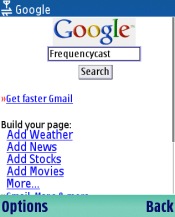
Google To try this out, from your phone’s |
| The screen’s tiny |
True, mobile That having |
| WAP has no |
Chances are, your mobile phone operator provides you with email access over WAP. O2 online provide their customers with an email account that can be accessed via applications like Outlook, over the web, or from a WAP phone. Another company that provides Web, WAP and text message email is BT Yahoo (formerly BT Openworld / BT Internet). See our BT Yahoo page. Additionally, there are services that allow you to access your POP3 |
 Fortunately, things have changed, and
Wap
links
A selection of useful WAP links
| WAP sites |
www.google.com – Every WAP browser’s dream. Search engine, plus web pages over WAP wap.tfl.gov.uk – Current problems with London Transport, tubes, buses wap.click4wap.com – Directory and mobile infotainment portal mail2wap.com – Mail2WAP lets you read your POP3 email from your Wap phone www.vodafone.co.uk/live– Vodafone Live / Vizzavi portal Portals – BTopenworld , Tiscali Mobile, Yahoo Search engines: Indexcell |
| WAP on a PDA |
Psion WAP |
| WAP browsers |
Yospace |
| WAP hosting |
Tag Tag – Free WAP gateway |
| WAP Gateways |
Mobilefish – List of WAP gateways o2 Mobile – Free access to WAP for UK customers (setup help) WAPMob – A free WAP gateway. Data calls cost approx 10p per minute |
| General | WAP test code List of WAP discussion boards and newsgroups WAP Forum – The home of WAP, and its specification |
| Books on WAP |
A
|


UK WAP gateway settings
The following table
shows basic WAP gateway setup information for the main UK mobile phone
operators. The menu options differ between handset manufacturers. Some
of the common menu fields explained:
- Bearer type:
There are two types: GSM or GPRS. GSM works
by dialling a dedicated WAP dial-up number and should work on any WAP-enabled
handset. GPRS is a newer technology, and only works on selected handsets.
GPRS is an always-on service that is billed per-kilobyte, and not as
GSM, which is billed per-minute. - Dial-up number
– The telephone number that your WAP browser needs to dial to connect.
(Not required for GPRS) - GPRS APN
– If connecting over GPRS (as opposed to dial-up),
you need an Access Point Node address, so the network knows where to
direct your request. See our GPRS for full UK
GPRS settings - Username and
password – Note that these are case sensitive, and should be typed
in as shown - Gateway
IP details – WAP works by routing traffic through a Gateway that
handles optimising the content efficiently. The address is made up of
a series numbers separated by dots. This may also be referred to as
the WAP Proxy Server address. - Homepage
–
This is the main page provided by a network operator… The front-door
for access to content provided via your network operator - Session mode
– See FAQ below
| o2 | Orange | Vodafone | T-Mobile / Virgin Mobile | |
| GSM Dial-up number |
+447712 927927 | +44797 3100500 |
+447836 900808 |
+44795 3968999 Virgin: +44795 3968988 |
| GPRS APN |
wap.o2.co.uk (Contract) payandgo.o2.co.uk (PAYG) |
orangewap (Contract) paygwap (PAYG) |
wap.vodafone.co.uk (Contract) pp.vodafone.co.uk (PAYG) |
general.t-mobile.uk Virgin: goto.virginmobile.uk |
| Username | o2wap (Contract) payandgo (PAYG) |
Orange | user@vodafone.net or web |
user or wapuser |
| Password | password | Multimedia | user or web |
wap |
| Authentication type |
Normal | Normal | Normal | Normal |
| Gateway IP address |
193.113.200.195 | 192.168.071.035 | 212.183.137.012 | 149.254.001.010 Virgin GPRS: 193.30.166.3 |
| Homepage | http://wap.o2.co.uk/ | http://orange.multimedia/ | http://wap:1999/vodafone.wml | http://wap.t-mobile.co.uk/ http://www.virgin.com/mobile/wap/ |
| Call Type: ISDN |
ISDN | ISDN | ISDN | ISDN |
| Session Mode | Permanent | Permanent | Permanent | Permanent |
| Notes | More on our o2 Wap page. | N/a | More on Voda GPRS | N/a |
This
site has pages dedicated to setting up o2
on a selection of smartphones and PDAs. Select a link from the side menu
for details of configuring o2. For more information
on o2 WAP, go to our dedicated o2 Wap page.
|
FileSaveAs currently recommends T-Mobile Mobile Broadband. More info |
WAP questions
 Q.
Q.
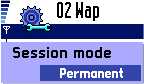
What exactly are the Connectionless/Connected/Continuous/Temporary settings all about? *
A. When connecting to a WAP gateway,
you normally have to specify a session mode. It’s all technical, and you
shouldn’t let it worry you. Your WAP service provider will normally tell
you which one to use, and you should set up your phone or browser accordingly.
The two options are:
- Connectionless
session – Also referred to as ‘Temporary’. Connects to port 9200 on
the Wap gateway server (or in theory, port 9202 with WTLS security)
- Connection-oriented
session – Also referred to as ‘Permanent’ or ‘Continuous’. Connects
to port 9201 on the Wap gateway server (or 9203 with WTLS security)
Q. I have free
WAP from o2 / (BTCellnet / Genie) running on my Psion. Can I use this
free connection to surf?
A. Sadly, no. When you connect to a WAP service, you go through a WAP
gateway that handles your connection to Internet content. The WAP gateway
is only designed to serve up WAP content, and HTML web pages don’t qualify.
(although see the "tip" about using Google, as above)
Q.
I’m having problems
connecting. What do you advise?
- Data services
have to be enabled by your Network Operator. If you can’t connect,
contact your network operator (e.g. o2, Orange, Vodafone), and ask
them to ensure that your SIM card is ‘data-enabled’. - If trying
to connect via GPRS, note that this is a different service to standard
dial-up data access. Again, contact your network operator to ensure
GPRS is enabled on your account. - Connecting via infrared
to your mobile? Ensure distance of between 5 – 15cm (too close may
swamp the IR eye). Also, ensure that Infrared is switched on on your
mobile, and that there is sufficient signal strength. - Still having problems? Double-check
your settings are 100% correct. Try getting the settings sent to you
using the Nokia Configurator at http://www.nokia.com/nokia/0,6771,32863,00.html - If you’re still having problems,
you’ll need to contact the network operator for help.For
more help, see our Connected? page
 Q.
Q.
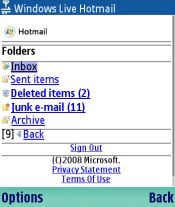
Can I access Hotmail over WAP?
A. Yes. Go to http://mobile.msn.com/ from a Wap browser, then select
"Hotmail" from the menu. The screenshot to the right demonstrates WAP
running on a Nokia Series 60 Wap browser.
Some users have found a problem with accessing Hotmail on older mobiles. Thanks to Dominic Self for supplying us with the
following method of getting access to Hotmail over WAP:
Go to http://www.hotmail.com/wap and enter your log on name and
password. Don’t worry when you reach the dead end.- Go to http://mobile.msn.com
and select MSN Hotmail. You will now get into your Hotmail Inbox!
Q. When I try to connect to a secure site, such as banking, I’m told
that my phone is not secure enough.
A. This could be something to do with the version of WAP that’s built-in
on the handset – Early versions of WAP handsets didn’t have WTLS security
included, and this is required by some secure WAP sites. You may want
to check the handset manufacturer’s site to see if your handset has WTLS,
or can be upgraded in some way.
Q. I get a message “Message from WAP: Sorry ,you’ve used the maximum amount of data allowed today."
This would indicate that you have used up your daily allowance of data download using WAP. If you’re not aware that you’ve been using WAP, you may have a service running in the background that’s trying to connect to WAP, or downloading content in the background. You should be able to disable WAP and Internet access on your handset if you don’t want to be using this service.
Got a question
about WAP you’d like answered? We can’t help with setup information for
every handset on the market, but we can try to point you in the right
direction, or add an answer to our FAQ section. Please let us know what
you’d like to know by asking a question in our forum…
