



Nokia 9210: Using WAP
Help and advice on how to set up a Nokia 9210 for WAP access, supplied by FileSaveAs in the UK
If you have a Nokia
9210 or Nokia 9210i communicator, the CD supplied with the Communicator
includes an installable WAP browser.
The advantages of the large screen and keyboard one-box solution are
obvious.
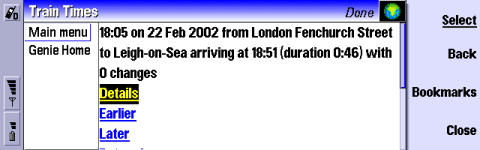
The Nokia 9210 Wap browser
Setting up o2 WAP on a Nokia 9210
Below
are some instructions for setting up WAP on a communicator. Here, we're
using O2
online (a UK mobile phone network operator).
To get WAP access, you need the following:
- An O2 SIM card (which gives you free text messages and a WAP allowance)
- A 9210 communicator.
- The Nokia 9210 browser
| O2
Wap / Mobile Internet settings: Homepage: http://wap.o2.co.uk/ Dialup access number: +447712927927 Gateway (IP) address: 193.113.200.195 Username: o2wap Password: password Secure connection: No |
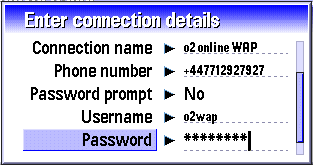
Setup the dialup settings in Extras |
Control panel | Internet access 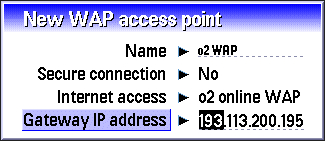
Setup o2 access from Internet | WAP |
Tools | WAP access...
Problems connecting
If you're having problems connecting to WAP, try the following advice:
- In order to use WAP, you must have data services enabled on your account. If you can't connect, contact your network operator (e.g. o2, Orange, Vodafone or T-Mobile), and ask them to ensure that your SIM Card is 'data-enabled'.
- Still having problems? Double-check your settings are 100% correct. The UK settings for the main network operators can be found on our WAP page. Alternatively, try getting the settings sent to your handset using the Nokia Configurator.
- If you're still having problems, best bet is to ask in our forum with details of handset type and error messages. Alternatively, contact your network operator for help.
Other links:
- For details of setting up WAP for other networks, see our UK WAP settings page
- To have Wap settings sent directly to your mobile, try the Nokia Configurator
- For help connecting to email, go to the 9210 connectivity page.
Bookmark this page:


