Top Links


Internet access
BT Broadband
Order Broadband
BT Fon Info
BT ToGo Info
Home Hub Help
Money off BT Bill

Broadband Info
Mobile Internet
Internet access
Internet hosting
Connecting PDAs
Broadband help
Glossary


Updates by email


Tried the FrequencyCast Podcast?


BT Yahoo Internet Information

Information on the services offered by BT Yahoo, plus help with setting up the service.

FrequencyCast Broadband Special

This page is primarily aimed at dial-up customers. For help with Broadband, see our BT Total Broadband page.


BT ToGo HandsetFree Smartphone from BT!

Want a free Windows Smartphone with BT Broadband? Get a free BT To Go when you sign to BT.

To get your free smartphone, go to bt.com/btbroadband. For more, listen to FrequencyCast Show 28 - our tech podcast.


BT's Internet Tariffs

BT is currently offering several tariffs:

Package
Monthly fee
Details
Broadband From £7.78 * BT Total Broadband - Speeds up to 20 Meg, and stacks of extras, including:
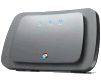
  • BT Home Hub 2.0Free BT Home Hub - BT's Wireless Internet Router - With 'N' technology for a wider range and better connection
  • Optional BT Mobile Broadband dongle for your laptop
  • Free security protection: Anti-phishing, Spam email filter, Email anti-virus protection, Anti-spyware & Identity theft support
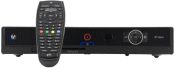
  • BT Vision Digital TV hard-disc recorder and access to on-demand content on your telly (More on BT Vision)
    BT Vision set-top box
  • Inclusive Wi-fi minutes from BT Openzone wireless access points
  • A Blackberry-like device, called BT ToGo
  • Free Technical Support (0800 number)

BT offers the following Broadband options:

  • Option 1* - £7.78 for the first three months for speeds up to 20 Meg. 10 Gig monthly transfer allowance. Free BT Home Hub and BT Vision available.
  • Option 2 - £13.69 for the first three months for speeds up to 20 Meg. 20 Gig monthly transfer allowance. Comes with Norton Security and a free BT Wireless hub.
  • Option 3 - £18.59 for the first three months for speeds up to 20 Meg. Unlimited monthly download. Comes with Norton Security and a free BT Wireless hub.
  • Broadband Anywhere - £23.48 for the first three months for speeds up to 20 Meg. As Option 3, but with a free BT ToGo Smartphone.

Order nowMore details at www.bt.com/btbroadband

Anytime £15.65

Dial-up access. Unmetered access to the Internet via a freephone number for up to 150 hours a month, with 10 email addresses, and 15 Meg of webspace. Payable by credit card or direct debit.

More details at register.btinternet.com

Pay-as-you-go None

Dial-up access. Only pay when you're online (by the minute) - great for low or mobile users. Charged at 1p per minute evenings and weekends. 5 email addresses and 15 Megs of webspace.

More details at register.btinternet.com

Prices correct as of Sept 2009

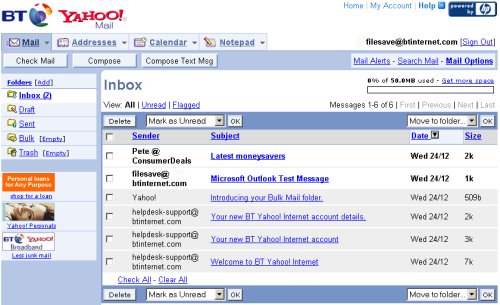
BT Yahoo Mail
Example of BT Yahoo Webmail

Knock some cash off your bill

BT Credit CardGot BT Broadband? With a little help from this credit card, you'll be able to knock money off your BT bill, just by using the card for day-to-day purchases.

More details at www.bt.com/creditcard.


BT Yahoo settings

Username / login name <username supplied by BT Yahoo, e.g. myname@btinternet.com>
Incoming (POP3) email server mail.btinternet.com
Outgoing (SMTP) email server mail.btinternet.com (Note: Now requires Secure Authentication)
Website (FTP) server ftp.btinternet.com or ftp.uk.geocities.com
Dial-up numbers: BT Yahoo Anytime 0808 993 3001
BT Yahoo Pay-As-You-Go 0845 756 0000
International PSTN 00 44 121 478 9200
News (NNTP) server news.btopenworld.com

For help with BT email settings, see our UK Email Settings page


Useful BT Yahoo information

  • Dialup service status report: Call 0800 731 7777 or check here
  • Broadband service status report: Call 0800 169 0199 or check here
  • BT Broadband Technical Support: 0800 111 4567.
  • Technical support helpdesk: 0808 100 5667.
  • Broadband technical support: support@btopenworld.com
  • Billing / Customer Services: 0800 633 5335 between 8am and midnight.

Setting up BT Yahoo on your mobile device:

If you have a mobile phone or handheld computer that can connect to the Internet for web and/or email, you may be able to connect with BT Yahoo on the move.

We have pages setup dedicated to providing a walkthrough of how to get BT Yahoo set up. Click on one of the following for specific setup details:

If your phone isn't covered in the list above, it means we may not have a dedicated step-by-step page, but the notes in this box should help.

First... If you're not a BT Yahoo customer, sign up to BT Yahoo free-of-charge and get a pay-as-you go account. No subscription fee, and you only pay standard rates for the time you're online.

Go to register.btinternet.com from a PC, and create an account. You'll then get some details that you'll need to set up your account on your mobile device. Here's a summary of what you'll need to enter on your mobile device:

  • Connection name: BT Yahoo
  • Data bearer: GSM
  • Phone number: 0845 756 0000
  • Username: (This is your email address, e.g. myname@btinternet.com)
  • Password: (as advised by BT Yahoo)
  • Outgoing mail server: mail.btinternet.com
  • Incoming mail server: mail.btinternet.com
  • Mailbox type: POP3


Frequently asked questions

How do I get an account?

You can sign up for a BT Yahoo! account on one of the following links: Dialup account or Broadband account


Status check

If you're having problems with BT Yahoo, first off, check that their services are running correctly at their Service Status page.

Check the Dialup-status page or Broadband status page for info on any problems with BT Yahoo. Alternatively, call free on 0800 731 7777 (dialup) or 0800 169 0199 (broadband)

Check mail online

BT Yahoo customers can access their email via the webmail service.

  • Go to bt.yahoo.com
  • Enter your username (e.g. yourname@btinternet.com) and password
  • From under the heading "BT Yahoo! Mail Preview", select "Inbox"

Error 553 on sending email

Having a problem sending an email from your PC? If you're seeing "Error 553" when you send, could it be that your email account is set to get your emails with a non-BT email address?

In 2008, BT added some extra security to their email sending. If your outgoing email address is different from your Btinternet.com email address, you need to register non-BT email addresses, so that they know they're legit.

To register your non-BT email address:

  • Go to http://bt.yahoo.com/webmail and sign in with your BTinternet address.
  • Go to Yahoo! Mail, select Options (on the right)
  • Select "Mail options", "Accounts", "Add or edit"
  • Add an account for your non-BT email address.


Faster connection? OnSpeed, for faster connectivityIf you're not able to get Broadband where you are and still want to get the speed benefits of a Broadband connection - or you're looking for a faster connection without the Broadband outlay - you might want to take a look at the service from OnSpeed..

To use the service, you'll need to download the special software from the OnSpeed. website. Once installed, you won't even notice it's there, it runs in the background speeding up your Internet connection and compressing data automatically. More details on our OnSpeed page

CD of BT Yahoo software

We've heard from a number of site visitors saying that they have a problem with the "order your CD" button on the BT Yahoo site. Here are some notes on this:

  • First off, the FileSaveAs website is not part of BT - so please don't ask us to send you a disk, or forward on your personal details. We can't help with CDs.
  • New or existing customers can download the BT Internet software, so you don't need a CD - pick PAYG or Anytime from register.btinternet.com and download the software you need
  • Try giving BT a call to request a CD - The number we have for BT Yahoo dial-up is 0800 633 5335. We understand that the number for a Broadband CD is 0800 085 7343. If you know a better number for BT Yahoo Customer Services, please let us know.

Closing account If you're looking to close your account, call the Customer Relation Team on 0800 085 2819 to arrange this. If it's a Pay-as-you-go account, you don't need to cancel (as you're not paying anything anyway), but if you wish to cancel, the number is 0800 633 5335.
If you're looking for an alternative to BT, see our Internet page.

Other links

  • Sign up for a BT Total Broadband account

  • BTOpenworld's WAP portal: http://wap.btopenworld.com/

  • For details on the benefits of Broadband access, see our dedicated Broadband page.

  • BT FON - Information about getting free access to wireless Broadband

  • BT Credit Card - An easy way to save money on your BT Broadband bill

Any questions? Please ask in our networking forum

Is this page correct? Something out-of-date or broken? Report a page error.
Please help us correct the problem and to keep this site up-to-date.

If you're looking for help, please don't use this option - instead use our forum