
This page contains information on UK Mobile Phone Network Operator, Orange
At FileSaveAs, we have pages dedicated to helping mobile users set up their phones for Web, email, multi-media-messaging and 3G access. Here, we offer some specific information that may be of use to Orange customers.
 Why choose Orange?
Orange is generally recognised as one of the more up-to-date and forward-thinking networks – they have a strong handset lineup, including a range of Android and Windows Smartphones, and they offer enhanced services such as live travel cameras and 3G data services. Orange and T-Mobile have recently merged, meaning that coverage is set to increase in the coming months.
They’re also good to their Pay As You Go customers, offering lots of free evening and weekend calls and texts for customers that top up regularly, and cinema-goes can take advantage of Orange Wednesday.
Find out more at strong>www.orange.co.uk
Orange useful information:
| SMS Service Centre number: |
+447973100973 This number is used to configure your phone for sending text messages. |
| Handset’s serial number: |
Enter ‘*#06#’ as a phone number, to get your handset’s serial number (known as the IMEI) – useful if your phone is stolen |
| Software version: |
Enter ‘*#0000#” as a phone number, to get your handset’s software version number. Doesn’t work with all makes of handset |
| Pay as you go credit |
Dial 453 from your mobile for the balance enquiry service, to check how much remaining credit you have |
| Contacting Customer Services |
For Customer Services:
|
| Stolen handset |
If your Orange handset is stolen, call Orange Customer Services immediately:
|
Orange GPRS / 3G settings
GPRS
offers an "always on" data connection
for mobile phones, allowing for faster web surfing and
email. Orange needs to enable GPRS settings for your
SIM card before you can use this. You’ll need to contact Orange Customer Services if you don’t have data enabled.
For more on GPRS, see our GPRS page.
The Orange GPRS
settings can be found on the Orange section of our GPRS
Settings page
Orange MMS settings
MMS is the abbreviation for Multi-media
messaging – sending images and videos between mobiles. Your network operator
must enable MMS settings for your SIM card before you can use this. You’ll
need to contact Orange Customer Services.
For more on picture messaging, see
our MMS page.
The Orange MMS
settings can be found on the Orange section of our MMS
Settings page
For
more help, see our Connected?
page
Orange WAP settings
WAP gives you access to special pages optimised for use on a mobile phone.
For more on WAP, see our WAP page.
The Orange WAP settings can be found on our WAP Settings page
|

Orange Frequently-asked
questions:
| What is my SIM card PIN? |
The Note that you get three tries to enter the PIN, and your phone will be locked if you fail after these tries. You’ll then need to contact |
| What is my PUK code? |
You If your phone is prompting you for a PUK code, You’ll need to phone Orange’s Customer Services department – they can provide you with a PUK code to unlock your SIM card once they have verified your identity. For security reasons, only Orange can legally provide you with a PUK code to unlock your Orange SIM card. PUK code help. |
| Odd items on your bill |
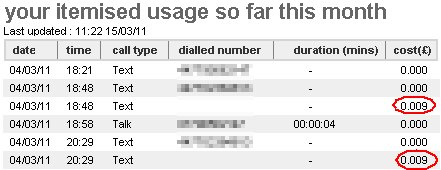
Even though you may be on a "free calls and texts" package, you may still see some unexpected costs on your bill. One that caught one of our team out, was a surprising £0.009 pence text message charge. Given that texts are free on our package, a one penny item appears with each text. In transpires that this relates to a text message delivery receipt. Our phone has the option to request a receipt to see when a text message has been received. It’s not made clear that this is a chargeable service, and as the setting on the phone applies to all text messages sent, it’s easy to run up a £3 bill for sending 300 free text messages. If you see this unexpected 0.009 text charges, check your phone and disable the "delivery reports" option
Got an Android phone? Here’s how to disable SMS delivery receipts |
| Using services abroad | Users with an Orange mobile phone account should be able to use their phone overseas, but note the following:
When ‘roaming’ on overseas network, note that it’s more expensive… also, if someone calls you while you’re overseas, you’ll pay for the International leg of the journey. Some other things to note:
For details of using Orange overseas, see the coverage and calling abroad page on the Orange site. |

Orange
Answer Phone Voicemail Frequently-asked questions:
| Voicemail retrieval number: |
123 from an Orange phone |
|
Change your voicemail settings |
Dial 123 from your Orange phone to change your answer phone settings. |
| Accessing voicemail from a landline or from abroad |
To If outside the UK, remember to prefix with +44 and lose the first |
| What is my PIN? |
Orange’s default voicemail PIN is 1111. If you haven’t set a PIN, this is likely to be your PIN number. If in doubt, you’ll need to contact Orange customer services. |
Useful links:
- Orange.co.uk
– Orange’s UK homepage - Mobile FAQ – Answers to common mobile phone questions
- Mobile Internet – Help and advice on getting high-speed net access on your phone or laptop
Question
not answered? Please ask in our forum
