
If you have an EPOC PDA such as a Psion Series 5mx or a Revo
Plus, you can surf WAP content using the Psion WAP browser. This gives you the advantage of QWERTY keyboard, and a screen that’s larger than that found on a mobile phone. With a browser and a mobile phone with infrared, you should be able to configure the browser to access whatever WAP sites you wish.
The Psion WAP browser is supplied free on the Revo Plus CD. It supports WAP1.1, but does not support connection to secure (WTLS) WAP content. It supports multiple ‘profiles’, and has excellent bookmark management. The Wap browser does not run on the Series 5, but will run on the Series 5mx, Revo, Revo Plus, Diamond Mako and Series 7/netBook. Psion WAP Browser details.
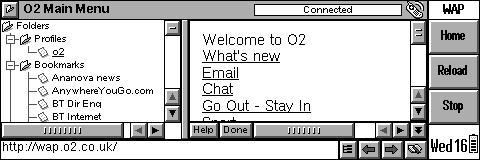
Psion’s Wap browser on a Revo Plus
Setting up WAP on a Psion
To connect to WAP sites from your Psion, you need the following:
- Wap Gateway details – A Wap Gateway is basically an account at an Internet server that allows you to route to WAP sites. (See our Psion WAP Browser page for details
of gateways suitable for use on a Psion). You enter the gateway settings in the Profiles section of the Psion Wap Browser. - Internet connection details. Some Wap gateways (such as O2, Vodafone, etc.) come with a dial-up number . You need to enter the dialup settings in the Psion Control panel
‘Internet’ settings section. - A
connection to the Internet – This could be using a mobile phone with a built-in
modem (such as a Nokia 6210, Nokia 8310, Nokia 5210, Ericsson T68, Siemens S45, Siemens S25i or Ericsson R320), or could be the Psion Infrared Travel Modem. Make sure the modem is switched on, and IR is enabled.
For troubleshooting help, see our Connecting a Psion page.
Setting up O2 WAP on a Psion

With O2
online (a UK mobile phone network operator), you get up to 1000 free SMS messages and an inclusive GPRS WAP allowance. It’s possible to use a WAP browser on a Psion PDA to access WAP services via the O2 WAP portal for free.
To get WAP access, you need the following:
- An O2 SIM card (which gives you free text messages and a WAP allowance)
- A
mobile phone with a modem (such as a Nokia 6210, Nokia 8310, Nokia 5210, Ericsson T68, Siemens S45, Siemens S25i or Ericsson R320), or the Psion Travel Modem. - The Psion WAP browser
| O2 Wap / Mobile Internet settings: Homepage: http://wap.o2.co.uk/ Dialup access number: +447712 927927 Gateway (IP) address: 193.113.200.195 Username: o2wap Password: password Session type: Continuous / permanent Port number: 9201 Note: Until May 2002, O2 Wap was known as |
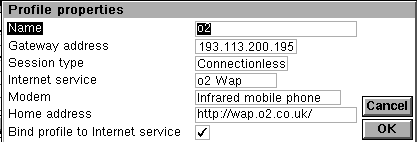
Psion WAP browser gateway settings
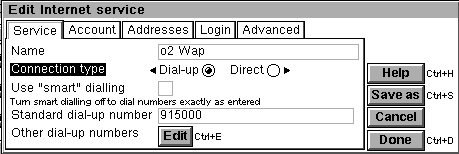
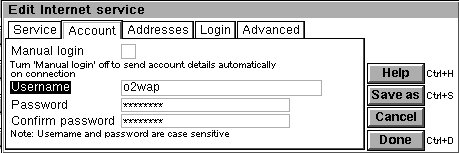
Editing the Psion Control panel Internet settings
Problems connecting?
- When communicating
with an infrared mobile phone, ensure that the phone’s Infrared is switched
on, and ensure distance of between 5 – 15cm (too close may swamp the
IR eye). - Ensure that your
Network operator (e.g. o2, Orange, Vodafone) has ‘data-enabled’ your
SIM card. If not, call their Customer Service people. - If you can connect,
but can’t browse content, it could be that your SIM is not data-enabled,
or that you’re trying to browse content that your tariff/connection
doesn’t allow – such as browsing web pages via a WAP
dial-up, or using an MMS APN (GPRS) to view WAP content. Check that
you have the right settings for the service you’re trying to access,
and that your Network Operator has enabled the service you’re trying
to connect using.
Other links
- GPRS on a Psion:
GPRS Quick Fix (archive), or the PsiLOC+ GPRS
helper – Getting GPRS running on a Psion
Questions?
Please ask them
in our Psion
discussion forum
Related Psion Articles
- Psion Information
- Psion F.A.Q – Your Series 3, Series 5 and Revo Questions Answered
- Psion Forum – One of the last remaining placed online to discuss your Psion device
