
Here at FileSaveAs, we’ve got pages of help on the BT Home Hub. Here’s a collection of questions we’ve been asked by people looking to get their first Home Hub.
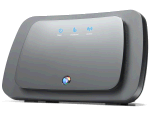 How do I get a BT Home Hub?
The BT Home Hub is available directly from BT:
- Free with BT
Total Broadband – www.bt.com/btbroadband - For purchase from BT Shop – www.shop.bt.com.
The BT Home Hub can only be used on a phone line enabled with BT
Total Broadband
Can I use a Home Hub on a non-BT line?
We’ve been asked if the BT Home Hub can be used on Broadband connections other than BT Broadband. Our understanding is that the BT Home Hub can only be used on a phone line that’s enabled for BT Broadband, and not with other providers (such as TalkTalk, Virgin Media, AOL etc).
All of the information that’s needed to connect (username, password, service addresses, etc) is hardcoded into the BT Home Hub’s built-in software, so you can’t edit the settings to get it running on a phone line that’s configured for another company’s Broadband service. There are a couple of exceptions to this though:
- Even though you can’t use the BT Home Hub as the main router on a non-BT Broadband line, you can still use it as a "repeater" – meaning that it’s connected to broadband via a different Broadband router. There’s information on how to do this on this thread in our forum.
- There is one form of workaround that allows you to use the BT Home Hub on a non-BT broadband connection… but it’s not for the novice, and it’s not supported by BT. The BT Home Hub is actually a re-branded version of an older broadband router, the Thomson SpeedTouch 7G, and you can re-flash the BT Home Hub’s operating system with a Speedtouch firmware image. There’s information on doing this here, but be warned, it’s risky!
If you need to get a router for use on a non-BT Broadband line, try pcworld.co.uk or Dabs.com
Can I use the Home Hub with Windows Vista?
We’ve been asked if the BT Home Hub works with Microsoft Windows Vista. According to BT, the BT Home Hub is compatible with Windows Vista. There’s a note that, as well as connecting via Ethernet or wi-fi, the Hub can connect via USB and this requires special Windows Vista drivers.
For more on the Home Hub and Vista, see www.bt.com/vistasupport. If you need help with the Hub and Vista, please ask in the Home Hub forum.
Can I use the Home Hub with a Mac?
Thanks to Tom for helping us out on this one. He says:
"Home Hub works perfectly with a Mac, and with a mixed Mac/ Windows network. It’s advisable to use both Firefox and Safari when browsing the hub admin panel, BT sometimes write terrible code that only one or the other browser will digest correctly. The latest Firmware updates seem to have sorted most of this out."
I’ve lost my Home Hub Software CD
 The BT Home Hub is supplied with a software installation disk. We’ve been asked where to get hold of a copy of this CD, by a user looking to reinstall the Home Hub onto a PC, and we’ve also heard from users having problems installing the Home Hub software from the CD.
The good news is, that you don’t actually need to install software onto your PC or Mac to allow you to set up the Home Hub. The Home Hub is pre-loaded with software needed to set itself up and administer the Hub. All you need to do is use a web browser on a machine that’s connected to the Home Hub. You need to enter the IP address of the BT Home Hub to get access to the setup screen – Home Hub Login Help
If you’d be happier with a CD – give BT a call on 0800 800 150 for a replacement.
Should I leave my Home Hub powered on?
The Home Hub is designed to be left powered on via the mains on all the time, as without it, you won’t get able to get always-on Broadband Advice, voice-over-Internet or TV-on-demand services. Page 43 of the Home Hub manual under ‘Please save energy‘ states: "Please disconnect the Hub from its power supply when not in use for an extended period, but remember when you do so, all connected devices (and any other devices that uses the hub to connect to your Broadband Advice line) will lose Internet access and BT Broadband Talk won’t work"
How safe is a Home Hub?
A question from Andrew Stacey… "BT has altered the channel to 6 on my Home Hub. Does this increase the radio waves also? Are these wireless hubs safe?"
The thirteen channels used for wi-fi in Europe are all within the same frequency range, 2.4 GHz range and there’s no power difference between the wi-fi channels. Channels are used to prevent clashes with other equipment on a similar frequency. Regarding wi-fi safety – wi-fi devices like the Home Hub output a fraction of the power of a mobile phone, operate over shorter distances, and you don’t hold the Home Hub to your head – please see our FAQ entry Is wi-fi safe? for more.
How much does it cost to run a Home Hub?
We’ve made use of a power meter to work out how much energy the BT Home Hub requires when in use. Here are our findings:
- The Home Hub v1 and v1.5 consumes 8 watts
- The Home Hub v2.0 consumes 10 watts (but has a standby mode that disables wi-fi and reduces consumption to 7 watts)
So, how much does it cost to run a BT Home Hub over a year? Less than £10. If you’re interested in the maths – see the Home Hub entry on our "How many Watts" page.
Wireless or wired connection?
We’ve been asked whether it’s best to connect to a BT Home Hub wirelessly or via an Ethernet cable.
Connecting via Ethernet offers a faster and more robust connection between a PC and a router. Speeds up to 100Mbps are possible. wi-fi is more prone to interference and is less secure. Top speed is 54Mbps. wi-fi is obviously more convenient than running cables around your home. As your Broadband speed is likely to be less than 8Mbps, the speed difference is unlikely to affect your Internet download speed.
How to: Set up BT Broadband
Need help with your BT Broadband email settings? Looking for the BT Broadband POP or SMTP settings? Having a problem sending emails via the Hub?
For connectivity settings for BT Broadband, see the FileSaveAs BT Broadband FAQ
Do I need Ethernet to set up the Home Hub?
Mike asked us the following: “My sister who is a first time on internet has just ordered the BT Hub which will be activated 7th Feb, she wants me to set it up for her, can you just tell me as its not clear.. do you set the hub up firstly using a ethernet cable direct and then remove ethernet.. or can it all be done wireless?”
Answer? It can all be done wirelessly. If there’s a computer in range, you can use the computer’s wi-fi to set up the Hub. No need for an Ethernet connection.
I need more ports!
Version 2 of the Home Hub comes with four Ethernet ports. What if you need more than four ports?
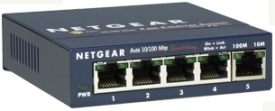
There are two options – One is to use wi-fi to connect to the Hub (wi-fi is wireless, and doesn’t use a port). The other is to get a ‘Network Switch‘. Switches commonly come in 5-port, 8-port, 10-port and 16-port versions. Connect one to your Home Hub and the other ports can be used for connection to equipment such as computers, printers and BT Vision, etc. Pictured below is a 5-Port Netgear switch. Switches are available from Maplin and PC World.
Need more Hub help?
We have a number of other pages offering help and advice on the Home Hub:
- Home Hub Security Settings
- Home Hub Port Forwarding
- Home Hub Phones and Telephony
- Logging in to your Home Hub
- Home Hub USB sockets
- Wireless settings on a Home Hub
- Troubleshooting Home Hub Problems
- Using a BT Home Hub with a second router
If you’ve got any questions we’ve not covered, or need help and advice, please ask in our Home Hub forum – Sign up and post a new message.
When posting – please make sure you include details of your computer’s operating system (XP, Vista, etc), which Service Packs have been applied, the software version your Hub’s running, and how you’re connecting (Ethernet, wi-fi or USB)
Other Home Hub resources:
- Hub Information: BT Home Hub Basics
- Common Questions: Home Hub FAQ , Home Hub Audio Guide
- More on the BT Home Hub: Jarviser Hub Files
- BT Fon Help: BT Fon Information
- Internet on the move? Mobile Broadband help
- Home Hub Chat: Home Hub Forum
- Help with wireless? Wi-fi Networking Advice
- Save money on your BT bills with a BT Credit Card
  PODCAST FEATURE: The "Unofficial Guide to the Home Hub" is a free downloadable audio file, helping with many setup and config issues. PODCAST FEATURE: The "Unofficial Guide to the Home Hub" is a free downloadable audio file, helping with many setup and config issues. Listen to the show online, or download it to your MP3 player. Listen to Home Hub Guide | What is FrequencyCast? | Add us to iTunes |
