
Information on BT Broadband, what the Internet service offers, plus some help and advice.
 What does BT Broadband offer?
BT is the largest provider of broadband in the UK. In recent years, BT’s focus has switched from offering a basic home broadband service, to offering a rounded package of broadband, phone and digital TV services.
BT Broadband offers several packages, starting with a basic package that has a fixed monthly download allowance, right up to super-fast 38 Meg packages and combined Internet-TV-phone-mobile packages.
BT is currently offering a range of extras to encourage people to make the switch to Broadband:
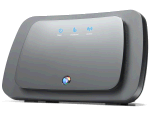
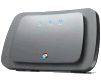 BT’s high-speed wireless Home Hub |
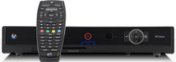 BT TV – home digital TV service |
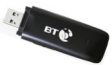 Optional Mobile Broadband dongle for your laptop |
 McAfee® Anti-virus, Firewall and anti-spyware |
- Free wi-fi router: Get the faster "N" BT Home Hub for free
- Digital TV: BT TV combines a hard-disk recorder with on demand films, TV shows and sport
- Free Mobile wi-fi: Inclusive Wi-fi minutes from on BT Wi-fi, plus access to BT Fon
- Free Security Protection: Anti-phishing, Spam filter, Anti-virus and Firewall
- Email: Multiple btinternet.com email addresses
- Mobile Broadband Dongle: Option to add a USB modem for your laptop
- Free Technical Support: Broadband help on an 0800 number
BT Broadband pricing:
|


Value for money?
BT’s current "big push" is offering value-add services, such as online security, the BT Home Hub and the BT TV Digital TV service, showing that BT offers better value for money than the slightly lower-priced Broadband Advice offerings from the likes of TalkTalk and Sky.
Here are their key selling points:
- BT Home Hub: This is key to BT’s current broadband offering, as it provides broadband access, wi-fi connectivity, and support for services such as BT TV (TV-over-Internet). At present, BT is giving away the Home Hub for free.
- YouView from BT: BT Broadband customers can get YouView with BT Vision. As well as offering over 70 live TV channels, this is a powerful TV recorder that lets you watch content on your telly via the Internet. Content includes films from its vast library, Barclays Premier League games and a wide range of TV shows.
The YouView box also pauses live TV and allows you to record up to 600 hours of programmes. More at bt.com/tv - Security: All of BT’s Broadband packages come with a range of extras to help protect your PC and your family against identity theft,
spam, email viruses, pop-ups, hackers – and help ensure your children
can enjoy the internet in a safe way. Get faster, safer internet access with
download speeds of up to 20Mb and improved online security.
To check out the benefits and see if you can switch, go to www.bt.com/btbroadband
BT Broadband Frequently
Asked Questions
| Can I get Broadband from BT? |
If you’re looking to get BT Broadband, you need to see if BT can offer it to your home via your telephone exchange. Use the BT Line Checker to find out what speed you should get – enter your phone number and postcode at the speedchecker: bt.com/btbroadband – this check will identify if you already have broadband. If not, you’ll get an estimate of your top speed if you were to sign up with BT Broadband. |
| How do I get an account? |
You can sign up for a BT Broadband account at www.bt.com/btbroadband/
|
| BT Technical Support |
Unlike many UK broadband providers, BT offers a free technical support helpline. If you’re with BT and need technical help, call 0800 111 4567 , 24 hours a day, seven days a week. In July 2009, BT announced that they would be bringing their call centres back to the UK after using call centres in India.
|
| BT Broadband settings |
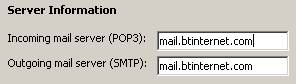
Here’s some information that may be of use to help with your BT Broadband connectivity setting, including BT’s POP3 and SMTP server addresses:
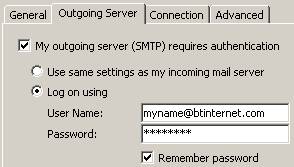
Screenshot of BT email server information entered into Outlook 2003: Outlook 2003 SMTP Authentication settings (‘More settings’ > ‘Outgoing server’): More info on our Setting up Outlook e-mail page |
| Problems sending email? |
If you find that you’re able to receive emails, but you’re having problems sending email from your BT Broadband account, there are two things you need to check:
|
| BT Broadband and the Home Hub |
For more on the BT Home Hub, see our Home Hub page, our Home Hub FAQ, or listen online to Show 9 of FrequencyCast, our online radio show.
|
| Wireless Home Broadband? |
If you have BT Broadband at home, you may want to go wireless. The BT Home Hub supports wireless, and if your PC or laptop already supports wireless, then you’re good to go. See our Wi-fi Explained page for help.
|
| Status check |
If you’re having problems with BT Broadband, first off, check that their services are running Having problems with Broadband? See our Broadband Problems section |
| Extra email addresses |
By default, with your BT Broadband account, you will be set up with an BT email address. This will be in the format username@btinternet.com. With BT Broadband, you can have up to eleven different email addresses. If you want to create another email address, go to www.btyahoo.com, sign in with your BT Internet email addresses, go to "My account" and select "Manage Sub Accounts". |
| Connection Problems |
Having problems with Broadband? See our Broadband Problems section |
| Speed Checker |
If you want to check the speed of your BT Broadband connection, you can use BT’s Speedchecker Go to www.speedtester.bt.com . To get to the detailed results, you’ll need to enter a username, which is bthomehub. |
| Mac users |
If you use an Apple Mac, you can use BT Broadband. The BT Home Hub connects to your home phone line, and allows you to connect using a wired Ethernet connection or a wi-fi connection. You don’t need any special software installed to use the BT Home Hub or your BT Broadband connection. You can manage the BT Home Hub’s software via a web browser.
|
| Videocalling with BT |
For more info, see our Videocalling page, or our reviews of the Videophone 1000 and Videophone 2000 handsets |
| Check mail online |
BT Broadband customers can access
|
| Broadband but no Internet |
Details of a problem we experienced, in case it’s of use to anyone else. The fault:
From what we could tell, it looked like we were getting a connection to the exchange, as the Broadband light was on, but no Internet connection. After phoning BT, we were told to log onto the Home Hub software, go to Advanced, then to Internet. This showed us as ‘Disconnected’. The instruction was to overtype the username with ‘bt_test_user@startup_domain’ (blank password) and try to connect. This connection worked. We then were told to enter ‘user@btbroadband.com’ (blank password) to get back to normal. Seemed to solve our problem. BT said it was a username authentication issue. |
| Other stuff: |
|
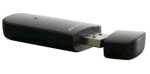 Not got wireless on your laptop or PC? Then you’ll need a wi-fi USB dongle, such as the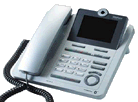
|
Got a question? Thinking of getting BT Broadband, and have a question? Contact us |
Useful BT Broadband information
- BT Broadband site: www.bt.com/btbroadband
- BT Broadband service
status report: Call 0800 169 0199 or check here - BT Broadband faults: 0800 111 4567
- Technical Support
helpdesk: 0800 111 4567. Alternatively,
submit online request via BT Support - Broadband technical
support: support@btopenworld.com - Billing / Customer
Services: 0800 633 5335 between 8am and midnight.
Broadband
links
- Check if Broadband’s available in your area at www.bt.com/broadband
- For details
on the benefits of Broadband access, see our dedicated Broadband
page. - Need help with getting your mail? Try our Email Settings
- Broadband Not Working? – Our page of advice on connection and speed problems
- Got a question about UK Broadband? Try our Broadband FAQ
- Nintendo help… Need help getting a Nintendo console online? Wii Connectivity and DSi connectivity
- Want to save on your BT bill? Consider a BT Credit Card for money off your BT broadband bill
Any
questions on BT Broadband? Please ask in our networking
forum
