
Many Palm
OS devices come with all the software you need to connect to the Internet.
Once connected, you can go online and check your email and browse the
web. This page provides details of how to get access to the Internet
and email from your Palm OS device…
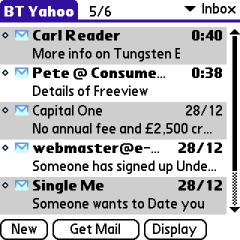 Email on a Palm |
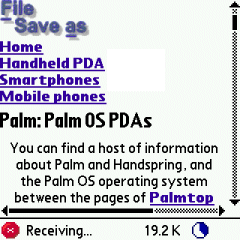 Surfing on a Palm |
In order to get
your Palm device connected to the Internet, you’ll need a modem. On this
page, we’re assuming that you’ll be connecting via your Palm’s infrared
port to a mobile phone with a built-in modem (such as the Nokia 6600).
Some Palm OS devices in the "smartphone" category, such as the
Treo 680, have a built-in modem, and some Palms can use Bluetooth for connectivity,
but for simplicity’s sake, we’ll assume an IR phone.
Note that your mobile phone account must be ‘data-enabled’. This is a
setting that your network operator has to enable for you. The Infrared
must be turned on, and the Palm device’s IR window must be pointing at
the phone IR window.
Getting
an Internet account
To connect, you’ll need to have an account with an Internet provider.
You may wish to use your existing Internet account, or apply for a free
account that can be used with your device. On this page, we’re assuming
you want a new account.
If you’re in the UK, and are looking for an ISP (Internet Service Provider)
that works well with on a handheld device such as a Palm, Clie or Treo,
try:
- BT Yahoo – We recommend BT Yahoo’s pay-as-you-go account for email and web access. There’s no subscription fee and you only pay for the time you’re online (details).
- o2
online
– Not useful for Web and email, but useful for the inclusive GPRS WAP allowance
(details).
Here is a step-by-step guide for setting up using BT
Yahoo.
If
you’re not a BT Yahoo / BTopenworld customer, sign up free-of-charge
for a BT Yahoo pay-as-you go account. There’s no subscription fee, and
you only pay standard rates for the time you’re online. Recommended for
on-the-move access to your email.
First, go to register.btinternet.com from a PC, and create an account. You’ll then get some details that you’ll
need to set up your account on the handset. Then, looking at the handset,
follow these instructions:
Set up your Internet connection
- From the main
menu, go to "Prefs", and select "Network". - You’ll need
to create a new service for BT Yahoo, so press the "New" button. - Add the following
details: - Service:
BT Yahoo - Username:
(This is your email address, e.g myname@btinternet.com) - Password:
(the password you entered when you created your BT Yahoo account)
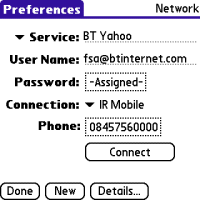
- Tap on the
Connection option, and select "Edit Connections…" - We now need
to set up the modem connection… Press the "New button" - Name: IR
mobile - Connect to:
Modem -
Via:
Infrared
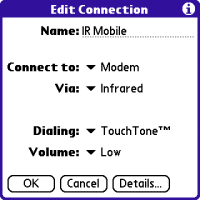
- Press "OK"
to save the setting, then at the "Available connections" screen,
make sure "IR mobile" is selected, and press "Done" - A new field,
"Phone" will appear. Add BT Yahoo’s dialup number of 08457560000 - Press "Done"
to save the settings
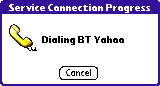
You should now be ready to connect to the Internet. Make sure your
modem is available and turned on (if using IR, turn the phone’s IR on
and align the windows, and either try to make a connection from an Internet
application, or test the connection from the ‘Connect’ button in Prefs
| Network.
Web browsing
Depending on the machine
you have, you may find that you’ve already got a Web. We rather like Handspring’s
Blazer
web browser (as it can also cope with WAP pages), but there are plenty
to chose from – See either the PalmGear or PalmOne software areas for
links to downloadable browsers that are either free, or available to download
on a try-before-you-buy basis. Fortunately, web browsers don’t require
any advanced setup, and as long as your connection is set up correctly,
they should just work. When you open the browser, and enter a web address
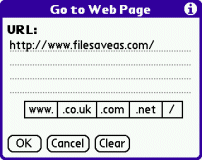
Entering a web address
on Blazer
Email software
You’ll need to have an email client installed onto your Palm device –
as there are so many devices and so many packages available, we can’t
provide details of how to set up every possible email client for every
possible Palm OS device, so we’ll pick a common solution, which hopefully
will be close to what you need.
 For
For
this page, we’ll be setting up the email software for a Palm Tungsten
E. The device doesn’t have an email client built-in, but has one supplied
on the CD from Palm. The program that the Tungsten
E uses for it’s email access, is Palm’s VersaMail.
You’ll first of all need to install the email program, if it’s not already
built-in to your Palm device. If it’s on the CD, look for the application
in one of the folders on the CD, or consider downloading VersaMail
(formerly known as MultiMail) from www.palmone.com.
Once you’ve found the file, install it by double-clicking the installation
file on your PC. After following the on-screen installation instructions,
you’ll need to connect your PC to your Palm and perform a HotSync, to
allow the email application to install onto the Palm.
Once this is done,
do the following:
Set
up your email settings
- Open the email
program on the Palm (in this case, VersaMail), and select "Account
setup" from the menu. - Press "New"
to create a new mail account - On the next screen,
enter the following: -
Account
name:"BT Yahoo" -
Mail
service: "Other" -
Protocol:
"POP3"
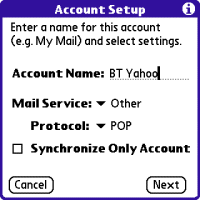
- Press ‘Next’.
On the next screen, enter the following: -
Username:
(This is your email address, e.g myname@btinternet.com) - Password:
(the password you entered when you created your BT Yahoo account)
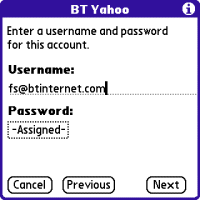
- Press ‘Next’.
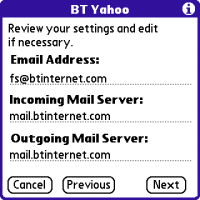
On the next screen, enter the following: -
Email
address: Your email address (This is your email address, e.g myname@btinternet.com) - Incoming
Mail Server: mail.btinternet.com - Outgoing
Mail Server: mail.btinternet.com
- Setup is complete,
so press "Done"
You have now entered
enough information to allow you to collect your email. Ensure your modem
is connected and your IR windows lined up, then from VersaMail’s mail
screen, select "Get Mail", choose "Subjects only"
and "Ok". The connection should dial up, you should sign on
to BT Yahoo, and start seeing your messages downloaded.
Wap browsing
WAP
pages are optimised for use over a mobile network, and lack the graphical
content and formatting of web pages, meaning they load faster.
-
For
more on WAP, and what’s available, see our WAP
page -
For
help setting up WAP on a Palm, see our Palm
WAP page
Problem
solving
Problems
connecting?
- When communicating with an
infrared mobile phone, ensure that the phone’s Infrared is switched
on, and ensure distance of between 5 – 15cm (too close may swamp the
IR eye). - Ensure that your Network operator
(e.g. o2, Orange, Vodafone) has ‘data-enabled’ your SIM card. If not,
call their Customer Service people. - If you can connect, but can’t
browse content, it could be that your SIM is not data-enabled, or that
you’re trying to browse content that your tariff/connection doesn’t
allow – such as browsing web pages via a WAP
dial-up, or using an MMS APN (GPRS) to view WAP content. Check that
you have the right settings for the service you’re trying to access,
and that your Network Operator has enabled the service you’re trying
to connect using.
Still
having problems? See our Connected? page, or
try asking in our forum
Problems
sending emails
If you can receive,
but not send emails, it is likely to be one of two things:
- If you get an
error such as "Problem sending message",
you may be trying to send a message to one ISP’s mailbox while connected
to a different ISP. To prevent spamming, most ISPs require you to
connect to their service (not someone else’s) in order to send an
email via their SMTP server. For instance, don’t be surprised if you
find that can’t send mail from your BT Yahoo account (using the server address mail.btinternet.com) if you’ve logged
on to Virgin Media. - Your ISP is looking
for CLI (Caller Line Identification), and it is not being sent – Some
Internet Service Providers (such as Wanadoo) use CLI to identify
users. If this is disabled, you can get around this by adding 1470,
in front of the telephone number.
Frequently asked
questions:
| Broadband / ADSL / Cable email |
If you have a Broadband Advice or cable account (such as Virgin Media), you may think that you can’t use your Palm to collect email via POP or IMAP, however, there is a form of workaround. Many broadband/cable suppliers offer dialup access too. Check with your supplier. Failing that, provided that the supplier uses POP3 email (as opposed to webmail), then you should be able to access your mail through another provider. Get yourself a free account with BT Yahoo and try to access your provider’s POP server. Note that sending mail from via your supplier’s SMTP server probably won’t work, so you may need to use BT Yahoo’s SMTP address. Alternatively, if in range of your broadband modem, you may be able |
| Hotmail and AOL |
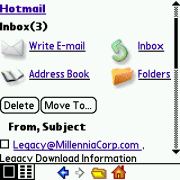
Hotmail and AOL use proprietary email systems, There is, however, an alternative. You can use a Palm OS web browser AOL: |
 Standard
More questions? Please
ask in our Palm
Forum
Other links:
- Palm’s UK Site – Information, support and Palm’s online store
-
Online
with a Palm – Help on getting your Palm OS device online for
Internet and Email - UK Internet – Information on recommended UK Internet providers
- Palm Connected – A copy of an old article from Palmtop User on Internet connectivity
