
Nokia 9500 & 9300: Using WAP
This page contains details of how to use WAP on a Series 80 communicator.
The Series 80 Communicator family includes the Nokia
9500 , Nokia 9300, and the Nokia 9210. This page focusses on the newer 9500 and 9300 – the 9210 has its own WAP connection page
Setting up o2 WAP on a Series 80 communicator
To get WAP access, you need the following:
- An O2
SIM card (which gives you free text messages and a WAP allowance) - A Series 80 smartphone (such as the Nokia 9300 and Nokia 9500).
- The built-in Series 80 browser (the
web browser supports WAP)
| O2 Wap / Mobile Internet settings: Homepage: http://wap.o2.co.uk/ Dialup access number: +447712927927 Proxy Server: 193.113.200.195 Port number: 8080 Username: o2wap Password: password Secure connection: No |
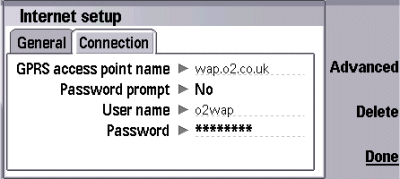
Setup the dialup settings via Desk,
> Tools > Control panel > Internet setup
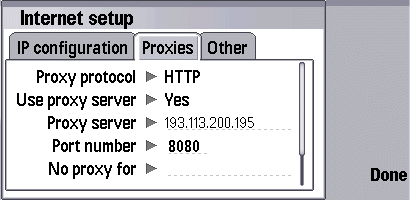
Setup the Proxy settings using the Advanced
button
Once set up,
you should be able to access WAP content through the Communicator’s
Web Browser. The Browser, from Opera, supports WAP as well as Web.
Problems
connecting
If you’re having
problems connecting to WAP, try the following advice:
- In order
to use WAP, you must have data services enabled on your account.
If you can’t connect, contact your network operator (e.g. o2, Orange,
Vodafone or T-Mobile),
and ask them to ensure that your SIM card is ‘data-enabled’. - If trying
to connect via GPRS, note that this is a different service to standard
dial-up WAP access. Again, contact your network operator to ensure
GPRS is enabled on your account. - Still having problems?
Double-check your settings are 100% correct. The UK settings for
the main network operators can be found on our WAP page. Alternatively,
try getting the settings sent to your handset using the Nokia
Configurator. - If you’re still having
problems, best bet is to ask in our forum
with details of handset type and error messages. Alternatively,
contact your network operator for help.
For
more help, see our Connected? page
Other links:
- For details of setting up
WAP for other networks, see our UK WAP settings page - To have Wap
settings sent directly to your mobile, try the Nokia
Configurator - For help connecting to
email, go to the Series 80 connectivity
page.
