
Don’t fancy running network cabling around your home? wi-fi not up to the job? Use a HomePlug to send data using your home’s mains wiring.
What is a HomePlug?
HomePlugs let you to send computer data ‘packets’ around your home using your existing in-house mains electrical wiring.
They typically are used in pairs, to allow equipment to connect to Broadband Advice without having to run lots of networking cable around your home, and without the need to use Wi-fi.
Using a HomePlug
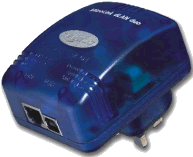 Plug in a HomePlug to a power socket near your PC or router, and plug an RJ45 data lead into the HomePlug.
From elsewhere in the house, plug in another unit, for access over the mains wiring. No new cables, no drilling, no mess.
Just use any power socket to access the Internet or home network throughout the whole house.
HomePlugs are perfect for connecting games consoles to the Internet, for hooking up your BT Vision set-top box, or for use with a Slingbox.
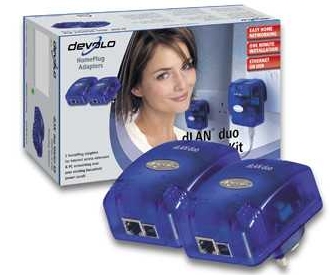
Pictured here is the MicroLink dLAN Starter Kit – this includes 2 HomePlug Ethernet adapters, for Internet access and PC networking over your existing household power supply.
These offer data rates of up to 200 Mbps, and ranges of up to 200m over your existing household power supply. Maximum security from eavesdroppers using DESpro encryption.
Getting a HomePlug
You can get HomePlugs, such as the MicroLink dLAN Starter Kit (pictured here) from
Dabs.com,
Maplin, and
PC World.
HomePlug Frequently-asked Questions:
| Homeplugs and X10 | We had a question in one of our older podcasts about whether Devolo HomePlugs can be used in a home that’s using X10. The good news is that, according to Devolo, their HomePlugs can be used with X10 home automation products, which use different frequencies and can coexist in the same household. |
| Which is faster – HomePlug or wi-fi |
Which is faster – Using a wireless network to put data around your house, or connecting via a HomePlug? Here are the numbers: Homeplug speeds: Basic homeplugs tend to offer speeds of up to 85Mbps, however both Dabs.com and Maplin stock faster Homeplugs that offer speeds of up to 200Mbps (with up to 200 metres transmission range), however speeds will decrease over distance. Wi-fi Speeds: The 802.11g standard supports a maximum of 54Mbps. The newer 802.11n standard (as used by the BT Home Hub) supports up to a theoretical maximum of 600Mbps, although in reality, you can expect about 150Mbps to the maximum. Again, distance is a factor, as is the amount of walls and floors that you want wi-fi to penetrate. |
| Security |
Q. How secure are HomePlugs? Can my neighbour hack in? The good news is, neighbours can only ‘see’ HomePlugs if they’re on the same mains phase, which is very unlikely. Even if they do, it’s possible to secure your homeplugs against intrusion. With the Devolo products, such as the dLAN Ethernet, you can set a secure password – using 56-bit DES encryption. |
| Mains circuits |
Q. Can home plugs be used to connect devices on different circuits in the same house? Where a home’s main circuits share the same electricity meter / consumer unit, there shouldn’t be a problem using Home Plug Powerline adapters. In the event that your home uses three-phase mains wiring (uncommon in residential setups), then Powerline adapters will only work on the same phase. |
| Multiple HomePlugs |
Q. I have a pair of HomePlugs to get Internet in a second room. Could I add a third HomePlug and get Internet in a third room? Yes, you can use more than one HomePlug receiver at the same time (i.e. one transmitter with two receivers) – Ideally if you’re going to use this configuration, using HomePlugs from the same manufacturer is best. Looking for an extra HomePlug? We recommend Maplin.co.uk |
Got a question about Homeplug adapters? Ask in our Home Networking forum
Useful links
- The Problem with Powerline – Powerline adapters upset radio hams
- Phone Extensions – Need an extra phone socket in your house? Details here
- Wi-fi – Wireless access to the Internet
- Mobile Broadband – Broadband on the move without wires
- Power Meters – Keep an eye on your home’s power consumption
