



Electricity Power Meters Explored
On this page, we look at meters that monitor your home's electricity consumption - here we explore the Envi Meter from Current Cost
What is a Power Meter?
As we all know, home electricity bills are on the rise. Sure, we can try switching to a lower tariff, but the only real way to save on your electricity bill is to cut down on the amount you use. Not as easy as it sounds though, as trying to work out how much each appliance costs to run is a tricky thing.
That's where a home energy meter comes in handy. There are several on the market, they're cost effective, and easy to use.
On this page, we're going to look at our favourite, the Envi meter from Current Cost - we're keen on this model as it can be connected to a PC to log data.
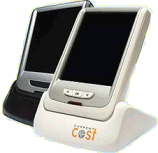
The Envi Power Meter from Current Cost
Setting up the Envi Power Meter
The Envi from Current Cost comes in a nice box with three bits - a display unit, a power supply for the display, and a rather odd box with a clamp on it.
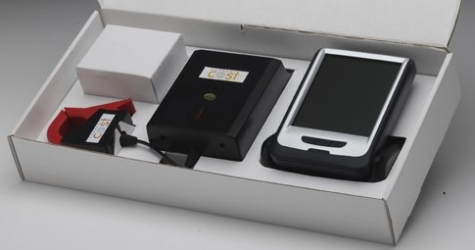
The first job is to install the clampy-thing. This has to be sited next to your home's electricity meter - probably in that scary cupboard under the stairs.
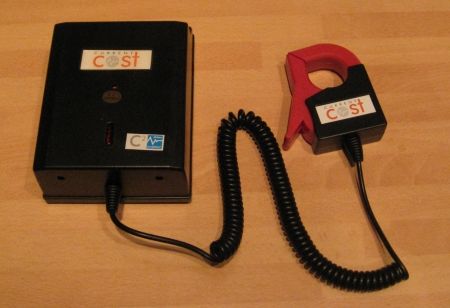
If you look at your electricity meter, there should be two big thick wires going in (coming from the outside world), and two going out (feeding your home's fuse box / distribution system).
The big red clamp supplied with power meters clips around one of the two wires leaving the meter to feed your home - The clamp can detect how much current is flowing through that wire at any given time, relays it to the connected transmitter box, and then your desktop monitor can receive and display information about your usage.
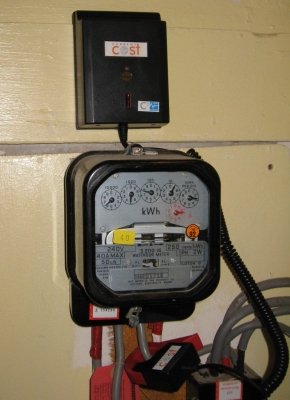
Now you have the transmitter in place, you can set up the desktop monitor. Some of these are powered by batteries, and some are powered from the mains. The Envi, reviewed here, is mains powered (seems odd plugging something into the mains to help reduce your mains consumption, but then the Envi is low powered).
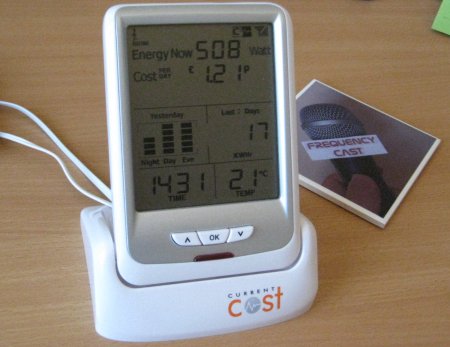
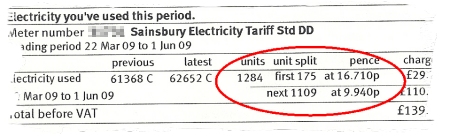
When setting up the meter, there are two settings you'll need to tweak - one is the time and date, and the second thing is the rate that you're charged - this will normally be a unit representing the kilowatt per hour price in pence, which you'll find on your electricity bill.
Once you've set the time and your usage charge, your desk unit will still there merrily telling you how much power you're using. Out Envi meter is here now telling me that we're consuming 761 watts, which would equate to £41 a month., It's also showing me that we've eaten 246kWHrs in the last 30 days, and our peak usage is in the evening. Loads of extra information can be displayed, and it's a great way of working out patterns.
We picked the Envi meter for its ability to connect to a PC for data logging. We needed to buy a special serial-to-USB lead to connect to the Envi's socket, and then we had to look for some software. We found a free package that we weren't that keen on, eventually plumping for the Techtonix Energy Station for a mere £10.
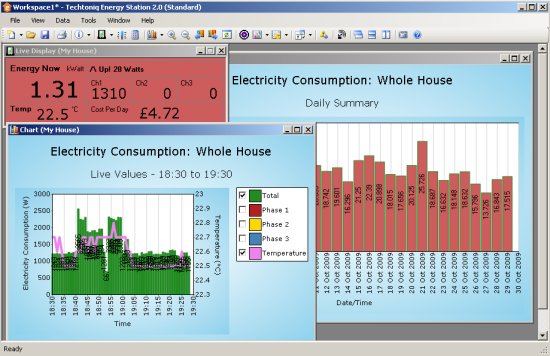
The Techtonix Energy Station package collates information about usage, letting you play with it in a number of different ways - you can see live consumption, a chart of recent consumption, historical information, as well as export data, do a cost analysis and even set up alerts when your consumption exceeds certain thresholds.
We've had our Envi meter hooked up to our energy efficient Packard Bell imax mini PC for some weeks now, and have been able to identify trends, and best of all, work out what's taking our power, and how to make savings.
|
Summary
Every home should have an energy meter, and without meaning to preach, we all need to do our bit and reduce consumption. Get yourself a cheap energy meter - you'll save on your bills, and be doing your bit to be greener.
  PODCAST FEATURE: We looked at Power Meters in Show 45 of our podcast. PODCAST FEATURE: We looked at Power Meters in Show 45 of our podcast. Listen to Show 45 | What is FrequencyCast? | Add us to iTunes |
Your questions
- These energy meters only seem to measure electricity? Is there a gas consumption monitor?
Measuring and recording electricity consumption is fairly straightforward and safe. The inductive clamp detects current in the mains cable without needing to be connected directly into your home system. With gas, it's not so easy, as you don't want consumers tampering with direct connections to the gas meter, for obvious reasons. Also, gas consumption calculations are affected by pressure and temperature. There are commercial engineer-install products available, but they're not cheap. The Uk Government wants Smart Meters in all homes by 2020, so affordable gas meters are in the pipeline (if you excuse the pun)
|
Got a question? Ask us |
Links:
Bookmark this page:


