
This page contains information on the Wii, Nintendo’s games console that was released in the UK in December 2006.
Rather than focusing on the games aspect of this machine, we’ll focus on the technical and connectivity aspects of what the Wii has to offer.
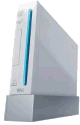
The oddly-named Nintendo Wii games console, which has support for wireless Internet, launched in the UK on 8th December 2006.
As with most new games consoles, when the Wii launched, there was a pretty major lack of machines around in the UK. At Filesaveas, we were lucky enough to get our hands on one at launch, and have added some information to this page, to help those in the UK looking to buy, or more importantly, set up the Wii.
The launch price for the UK Wii was £179.
|
What is the Wii?
As if you didn’t know! The Nintendo Wii is a new games console, continuing the successful line of gaming devices from Nintendo.
  PODCAST FEATURE: PODCAST FEATURE: We got to grips with the Wii in Show 10 of our online tech radio show. Listen to the show online, or download it to your MP3 player. Listen to Show 10 | What is FrequencyCast? | Add us to iTunes |
The Wii console boasts 512 megabytes of internal flash memory, two USB 2.0 ports and built-in Wi-Fi capability. A bay for an SD memory card will let players expand the internal flash memory. Design was optimised with state-of-the-art processing technologies that minimise power consumption, keep the console compact and enable the "sleepless" WiiConnect24 mode.
The Wii console will have downloadable access to 20 years of fan-favourite titles originally released for Nintendo 64, the Super Nintendo Entertainment System (SNES) and even the Nintendo Entertainment System (NES).
The Virtual Console also will feature a "best of" selection from Sega Mega Drive titles and games from the TurboGrafx console (a system jointly developed by NEC and Hudson).
If you have a question on the Wii that you’d like to see answered in our F.A.Q, please get in touch – technical questions only – we’re not gamers here – we’re techies!
Getting the Wii online with wifi
The Nintendo Wii allows you to get online to do a range of things, including download some of the Nintendo back catalogue of classic games, and surf the Internet.
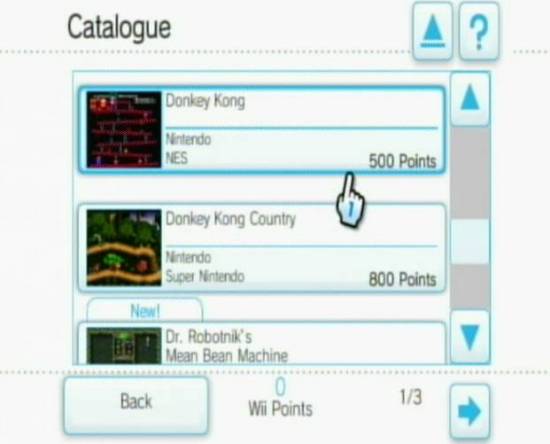
Nintendo Wii Games Catalogue online
If you have a home Wi-fi network, then you can set the Wii to make use of this to get online. Here’s a step-by-step guide designed to help you connect your Wii to the Internet via wifi:
Before you’ll start, you need to know some basic information about your wi-fi network. Here’s some stuff you’ll need to know.
- To connect your Wii using wi-fi, you’ll need to make a wireless connection to a wi-fi Broadband router , such as the BT Home Hub
- The Wireless Broadband Router will have a number of settings you’ll need to be aware of. If you’re not sure, you’ll need to log on to your Router (normally using a web browser), and look through your Router’s software for the information you’ll need. If you’re not sure how to get this information from your router, refer to your router’s documentation.. Here’s what you’ll need to know:
- SSID – This is a special name for your wireless network, which is transmitted by the router
- Security – Your Router should employ some kind of security, to keep hackers out. This is commonly either WEP or WPA encryption. You need to know which type of security your router uses, and the appropriate encryption ‘key’, to allow you to connect
- IP address – Your router will have a home IP address (called a Gateway address – four numbers separated by dots). The router will also be able to assign IP addresses for equipment in a given IP address range. When the Wii connects, it will need its own IP address. Most commonly, a router can automatically assign an IP address using a service called DHCP. Log on to your router, and set up LAN access (local network access) so that DHCP is enabled.
- Subnet mask: A special address that’s common across your network (should look like: 255.255.255.0)
Once you have the basic information about your router and network, you should be able to proceed with the following steps:
- Go into the Wii Menu, and select ‘Wii Options’
- Select "Wii Settings"
- Press the Right arrow, to get to the second page, then select "Internet"
- Select "Connection settings", select "Connection 1" then choose "Wireless connection"
- You then have the option to "Search for an Access Point", use the "Nintendo wi-fi USB adapter", or opt for "Manual setup". If you have a standard network, you can go for "’Select an Access Point", which scans for all available wi-fi access points. Find yours, which should be identified as the SSID (name) of your router wireless network. For this walkthrough, we’re going to access worst-case, that you can’t use Automatic, and want to set up manually. We’re going for "Manual setup".
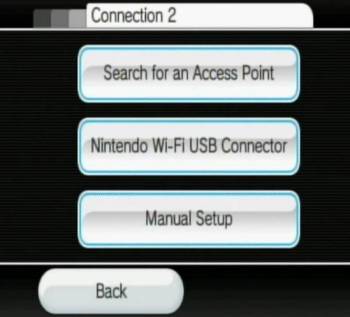
- On the first screen of "Manual setup", you need to enter the SSID (name) name of the wi-fi Access Point
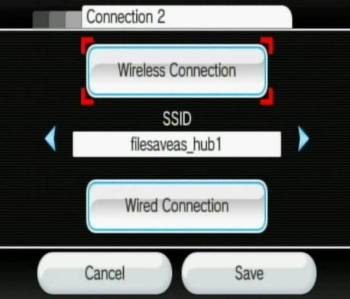
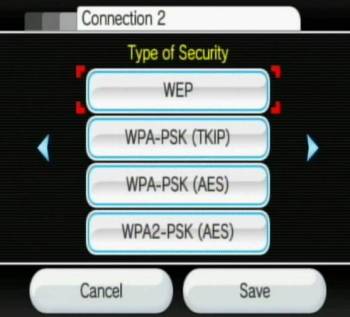
- Press the Right arrow. Now, you need to enter security information needed to connect to the wireless access point. Here, the options are: WEP, WPA-PSK(TKIP), WPA-PSK(AES) or WPA2-PSK(AES). Select the option that corresponds with your wi-fi router’s access security, then enter the appropriate encryption key.
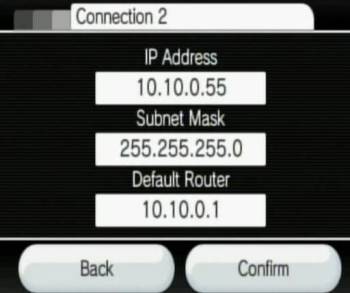
- Press the Right arrow. This presents the option to assign an IP address automatically (if the access point uses DHCP), or enter one manually. Where possible, it’s best to go for DHCP, as we mentioned above. DHCP has to be enabled on your router. Again, for the worst-case scenario, we opted for manual. Then you can enter the IP Address , Subnet mask and default router IP addresses. As above, all of this info should be accessible via your wi-fi router software
- Press the Right arrow. This presents the option to auto-obtain a DNS address (used to look resolve Internet addresses into IP addresses). We opted to enter our ISP’s DNS manually. Here you can enter a primary DNS and secondary DNS
- Press the Right arrow. This gives you the option to select a proxy server (which we didn’t require). This option allows entry of proxy server address, port number, username and password
- Press the Right arrow. This allows entry of an MTU value (if in doubt, ignore)
- Press "Confirm" to complete the process
Once you’ve completed setup, the Wii will perform a basic connectivity test. Assuming it’s worked, you’ll now be able to get online. From the Wii main menu, go to the Wii Shop Channel, and you’ll be able to browse for a selection of online games to buy and download to your Wii:
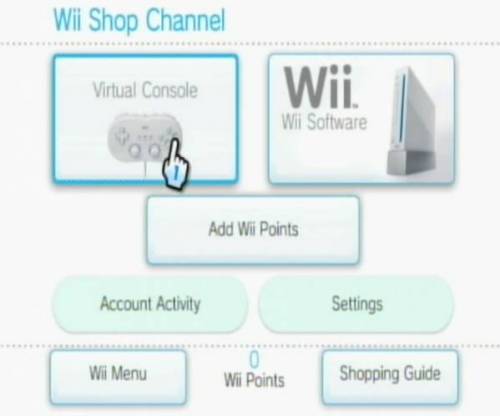
Nintendo Wii’s online store, on a Wii
Go for "Virtual console" – note that to buy a game, you’ll need to get some Wii points. As of December 2006, 1000 Wii points, purchased on a credit card, will cost £6.99.
Web browsing with the Wii
A web browser was made available for the Nintendo Wii in December 2006. At the time of writing, this is a trial browser, and it’s powered by Opera. You can download this onto the Wii by going to the Shopping Channel from the Wii Main Menu. From this channel, select "Start shopping", go to "Wii Software" and select "Internet Channel Trial Version".
Below is a screenshot of our podcast’s website, as viewed by the Wii’s web browser:
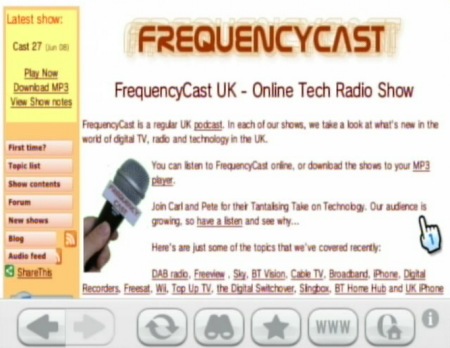
Web surfing with the Nintendo Wii
F.A.Q
Frequently asked questions on Nintendo Wii connectivity:
Q. I can’t link in my existing Nintendo VIP Club account email address when setting up my Internet access on the Wii
A. We had this problem. Seems the problem went away when we’d entered the PIN number for the Wii console into www.nintendovip.com – Seems you can’t associate an online VIP account until the Wii’s PIN (in the Wii box) has been entered into your existing Club Nintendo account.
Q. Can I use my old Gamecube games and controllers with the Wii?
A. Yes. Gamecube games play fine in the Wii, but the new wireless Wii controllers don’t work with the Gamecube games. You’ll need to plug your old Gamecube controllers into the Wii – there are four ports under a panel at the top of the console. We’ve tried a few old Gamecube games, and they work fine using our original Gamecube controllers (even a wireless Gamecube controller)
Q. I don’t have a wi-fi network that I can use to connect my Wii to the Internet. What are my options?
A. There are three options:
- Get a wi-fi Broadband router (such as the BT Home Hub) and set up a wireless network
- If you have a wired broadband router with a spare ethernet socket, you could consider buying a Wii LAN adapter. This plugs into the USB port at the rear of the Wii, and has a socket for an Ethernet RJ45 plug that can be plugged into an Ethernet port on a router. Wii LAN adapters became available in the US in early January 2007. In March 2007, we found stock of the Datel Wii LAN Adapter at Play.com, as well as at Amazon. When connecting with a Wii LAN adapter, you need to select Connection Settings > Wired Connection
- The other option is to connect your directly to your PC, and use your PC’s Broadband connection.
For this, you’ll need the Nintendo Wi-Fi USB connector (NTR-010). This allows your Wii to communicate using wi-fi via the adapter that’s plugged into a spare USB port on your PC. The Nintendo Wifi USB connector was originally released for the Nintendo DS, but works perfectly with the Wii. In the UK, the wi-fi USB connector is available from Play.com or Amazon
Q. I can’t get my Wii to connect using wi-fi. Can you help?
A. Not without more details. First off, try the general advice in our wi-fi problem section. If you need more help, ask in our Networking forum.
Q. I need to know what frequency the Wii operates at. I can’t find this info anywhere, can you help?
A. The Nintendo Wii uses Wi-fi to talk to a wireless access point for Internet access. The Wii supports the 802.11b and 802.11g wifi standard, which uses a number of channels around 2.4GHz. In Europe, there are 13 channels that can be used, and the channel number is normally set at your access point.
Q. We have a dial up connection and we are wondering how we can connect our Wii without having a wireless connection.
A. Sorry, but as far as we know, you can’t connect the Wii using dial-up. The Wii does not have a built-in modem, so can’t connect directly to a phone line. Your best bet is to get Broadband Advice with a wireless router (We recommend BT Broadband which can be supplied with a free wireless router). If you really can’t get Broadband, and you have a PC – you could share your dial-up connection on your PC, by getting a wireless adapter for your PC and using wi-fi to connect from the Hub. Even if you are able to get dial-up working, at 56k dialup speed is unlikely to be much use on the Wii.
Q. Can I put the Wii through my laptop? Or rather, what would I need to enable this?(VAIO) I travel around a lot and this would make hotel rooms a whole lot more fun!
A. In theory, there’s no reason why not, although we’ve never tried it. You’d need to get a PC TV Tuner USB dongle that can cope with an AV Input (from the Wii) to turn your laptop into a TV monitor. We found one card that may be suitable – the KWorld Hybrid USB Hybrid, which supports composite video in – this is available from Maplin (£34.99 – cat number A02FW). No promises, but it seems like this might do the job. If you’re in a hotel room, there’s always the hotel TV set. You could also consider something more portable, the Nintendo DS
Other Wii Questions
| Black and White? |
If you’re finding that you’re only seeing a black & white picture from your Wii, you probably have a mismatch between the |
| Regions? | The UK Nintendo Wii is region-locked. Games purchased outside Europe won’t play on a standard UK Wii. |
| Remote control problem |
What happens if your remote controllers stop working? Could be that your batteries need replacing. If you’ve changed batteries or reset your Wii, it could be that the handsets have lost their sync – so the wireless connecting between remote and Wii has been lost. Here’s how to re-pair your controller to a Wii:
Other Remote issues include: Sensor bar not plugged in, object blocking path to sensor bar, controller too far away, batteries low or wrongly inserted, bright light/reflective surface between controller and sensor bar. |
If you’ve got a question about connecting the Wii, or Internet connectivity, please feel free to ask in our Networking Forum.
Useful links:
- BBC iPlayer– Now available on the Nintendo Wii
- Nintendo DSi Help – Got a Nintendo DSi you want to get online?
