



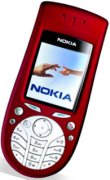
Nokia 3660 Smartphone
|
One
step on from Nokia's 3650, The Nokia 3660
uses the Nokia Series 60 platform (powered by Symbian OS v6.1),
and is a combined mobile phone, digital camera (with video) and
PDA. It features a slightly more standard keyboard layout than it's
predecessor. It was released at the end of 2003. Features: Colour screen, MMS, video camera, MMC memory slot. The 3660 also has built-in video software, and is a tri-band phone, so is suitable for use in the US as well as Europe. Note that the 3620 is the US-version of the 3660. Size: 130 x 57 x 26 mm Weight: 130 grams UK Availability: Now discontinued. Take a look at a newer handset - See other Series 60 handsets in the range |
Related Nokia 3660 Links
- AllAboutSymbian - Great for general Series 60 information
- Handango- 100's of shareware titles for Symbian OS phones
- Discuss the 3660 - Your thoughts on the Nokia 3660
- MySymbian- Site with details of the Nokia smartphone range
- O2 online - UK mobile phone network operator, offering free SMS text and Wap access. (Details)
Nokia 3660 FAQs
| Operating system | The Nokia 3660 uses the Symbian Operating System. To check the version number, type *#0000# |
| Accessories? | There's
a wide range of accessories, including spare batteries, cases, chargers,
in-car kits, hands-free units, data cables and fascias, available at Carphone
Warehouse and MobileShop. . |
| Sorting of Contacts | There doesn't
appear to be a way of changing the sort order from 'Surname Firstname'
to 'Firstname Surname'. Many users have tried to find such an option, but it appears there isn't one. You may like to try NameSwap, available from http://my-symbian.com/s60/software/applications.php |
| Can I access Hotmail? | 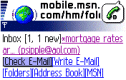 The
Messaging application doesn't support Hotmail's email format, and
there's no HTML web browser on the 3660. However, there is still
a way of accessing your Hotmail email messages on the 3660. From
'Services', enter the URL http://mobile.msn.com , and you'll
be able to access your Hotmail mail via WAP (Note that with o2 as your provider, you get an inclusive GPRS WAP allowance, meaning free Hotmail from your mobile. See our Series 60 WAP help page for Wap setup instructions) The
Messaging application doesn't support Hotmail's email format, and
there's no HTML web browser on the 3660. However, there is still
a way of accessing your Hotmail email messages on the 3660. From
'Services', enter the URL http://mobile.msn.com , and you'll
be able to access your Hotmail mail via WAP (Note that with o2 as your provider, you get an inclusive GPRS WAP allowance, meaning free Hotmail from your mobile. See our Series 60 WAP help page for Wap setup instructions) |
| Default Contacts | For contacts with lots of phone numbers, note that you can set one default mobile, work and home number. Select Options - Defaults, then set the 'Phone number' to the numbers as appropriate. They'll then get a little icon on the left hand side of the contacts menu. |
| How do I turn reports off? | Messaging | Options | Settings | Short message | Receive report: Yes / No |
| Can I use it as a modem? | 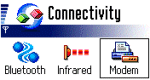 Yes.
The 3660 has a 'modem' option under 'connectivity'. Selecting this
option allows another device (such as a Psion or Pocket PC) to connect
to the Internet using infrared. We have successfully tested this
with a Psion Revo Plus, a Palm V and a Packard Bell 2060 Pocket
PC. Standard IR modem settings appear to work. Yes.
The 3660 has a 'modem' option under 'connectivity'. Selecting this
option allows another device (such as a Psion or Pocket PC) to connect
to the Internet using infrared. We have successfully tested this
with a Psion Revo Plus, a Palm V and a Packard Bell 2060 Pocket
PC. Standard IR modem settings appear to work. |
| How do I hard reset a 3660? | 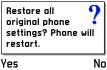 The
reset code is *#7370# . All data will be lost if you use
this feature. Information obtained via Italian Nokia newsgroup
- Original Article. The
reset code is *#7370# . All data will be lost if you use
this feature. Information obtained via Italian Nokia newsgroup
- Original Article. We accept no responsibility for use of this code. It is undocumented, not supported by Nokia and should be used at your own risk. |
| Email from your 3660 | If you're looking to use your 3660 for sending and receiving e-mail, consider taking out an account with free provider, BT Yahoo. For details of connectivity on a 3660, Series 60 Connectivity section. |
| How do I use WAP / What is 'Services'? | The 3660 does not have a web browser, but does have a WAP browser, which can be accessed via the Services menu. For details of Wap on a 3660, and setting up the Wap browser, see our 3660 WAP page |
| Email problems | If attempting
to retrieve email gives you a "General: System error",
make sure you have "Gateway IP address" set to 0.0.0.0. (Tools |
Settings | Connection | Access points) This message also appears if you are trying to connect to an email account over a WAP connection (e.g. trying to connect to BT Yahoo's mailbox while dialed up over o2's WAP service). Also, see our 3660 connectivity page |
| Recycle your mobile |
Don't leave it in the back of a drawer - see if it can find a new lease of life, and pocket you some cash. For a summary of the best deals on making cash from your old handset, try the comparison search tool at www.sellyouroldmobile.co.uk |
| How do I install software without IR or Bluetooth? | If you don't
have the ability to beam files to the 3660 via Bluetooth or infrared (either from another handheld device or from a PC),
then you may wish to purchase a Bluetooth or IRDA adapter for your
PC (this means you'll be able to install software, backup and synchronise
your 3660) - See below. There are a couple of alternatives however. One is to email the file that you're trying to install, typically a SIS (Symbian installation file) to your own email account, and then use your 3660 to logon to your email and download the SIS file as an attachment into your 3660 Messaging Inbox. For instructions on how to set up email on your 3660, see our connectivity page. The other is to use the 3660's MMC card slot and a PC MMC Memory card reader |
| How do I connect my 3660 to my PC? | The 3660 can connect to a PC via Bluetooth or infrared. Here is a summary of how to connect your 3660 to your PC.
Files beamed to the 3660 can be found in the Messaging application, in the Inbox folder |
| Can I browse the web from my 3660? |  The
3660 comes with a Wap browser that is
capable of viewing web content designed for use over the Mobile
Internet. If you're looking for HTML web access, take a look at Doris Browser. This is a small Java application that can be evaluated
for free for ten days. Once installed, you can find it from the
Tools | Apps icon. The browser supports image rendering, access
to secure sites as well as viewing Word and PDF documents - and
it all fits in under 50k. The
3660 comes with a Wap browser that is
capable of viewing web content designed for use over the Mobile
Internet. If you're looking for HTML web access, take a look at Doris Browser. This is a small Java application that can be evaluated
for free for ten days. Once installed, you can find it from the
Tools | Apps icon. The browser supports image rendering, access
to secure sites as well as viewing Word and PDF documents - and
it all fits in under 50k. As an alternative, the fully-featured Opera browser is available for the Series 60. and can be downloaded from here. |
| How do I delete message reports? | It's possible
to set up Messaging to send you a 'delivered receipt' when a text
message gets delivered ("Settings | Short message Receive report".
Receipts are stored in the Log application. It's not possible to remove individual items from the Log application, the entries will disappear when they are older than the "Log duration" setting. ("Log | Options | Settings"). There is a 'Clear log' option in the "Log | Options" menu, which will remove all log entries, including the call costs and durations. |
| Extra memory for 3660 | 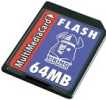 The Nokia 3660 supports
MMC cards for memory expansion. Nokia can sell you their own MMC
cards, but their prices for Nokia-branded cards are higher than
for standard cards. We've not heard of any incompatibility with
non-Nokia cards, so it's worth shopping around to get a third-party
card. Here are a few online options: The Nokia 3660 supports
MMC cards for memory expansion. Nokia can sell you their own MMC
cards, but their prices for Nokia-branded cards are higher than
for standard cards. We've not heard of any incompatibility with
non-Nokia cards, so it's worth shopping around to get a third-party
card. Here are a few online options:
For more details, see our Memory Card page |
| Can I use the 3660 in the States? | Yes. The 3660 is a tri-band phone operating on EGSM900/1800 (Europe, Africa, Asia Pacific), and GSM1900 (USA, Canada, South America). There should be no problem using the 3660 with network operators in these countries. Roaming restrictions from your network operator may prevent use of some services in other countries. Note that the Nokia 3620 is the US variant of this handset. |
| How do I install ringtones? | 3660 supports
playback of .mid or .wav files, and use of these file formats as
ringtones. To use such a sound file, beam or email the file to your
3660. It will then appear in the Messaging Inbox. Open the message
and select 'Options | Save'. Then, from 'Profiles', select a profile
and set the 'Ringing tone' to the new file. For more on ringtones, see the mobile phone FAQ |
| How do I get to the ringtones settings? | Go to Profiles, select which profile you're in (if you're not sure, it's probably 'General'), press 'Options', 'Personalise', then press on the 'Ringing tone' option. Scroll up or down, and press 'Select' on the tone you want. |
| How do share my pictures with others? | Once you have taken a picture on the 3660, there are three ways to get the files from your phone to other people or computers:
|
| Changing the default picture | To change the default wallpaper image used in the phone application, do the following:
|
| Who's calling? | Thanks to caller display, we can see who's calling. For answers to your Caller Display questions, see our Caller Display Series 60 FAQ |
What's
my 3660's serial number? |
Enter '*#06#' for your handset's serial number (known as the IMEI) - useful if your phone is stolen |
| Default lock code | The default
lock code is 12345 In the event that you've forgotten your lock code, take your phone to a Nokia Service Centre... they can unlock it for you. |

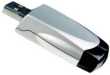

 Memory card reader.
If you don't want to beam files from your PC to the phone, another
option is to make use of the MMC card slot in the 3660. Get
hold of a
Memory card reader.
If you don't want to beam files from your PC to the phone, another
option is to make use of the MMC card slot in the 3660. Get
hold of a 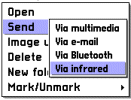 You
can copy it to your PC with the Nokia software supplied on the
CD (see
You
can copy it to your PC with the Nokia software supplied on the
CD (see Bookmark this page:


