



Nokia 9300 - Mobile Phone Information
|
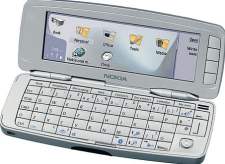
The Nokia 9300 is powered by Symbian OS v7 (Series 80), and is a combined mobile phone and PDA in Nokia's 'Communicator' series. The 9300 has much in common with the more powerful Nokia 9500, but lacks the Wi-fi support and has no digital camera. The 9300 was updated to the 9300i, which does have wifi, and it has the following features:
For full details, take a look at Nokia's 9300 page |
Useful Nokia 9300 Links:
- Handango - Top site that offers a huge range of software titles for Symbian OS phones
- Connecting with a 9300 - Help setting up email and web access on a 9300
- 9300 discussion group - Get talking about the Nokia 9300
- UK Technology Podcast - Free online radio shows covering TV and Tech
FAQ
| Email from your communicator | If you're looking to use your communicator phone for sending and receiving e-mail, consider taking out an account with free provider, BT Yahoo. For details of connectivity, see our Series 80 connectivity page. |
| How do I install software? |
Sometimes SIS files are distributed inside a ZIP file (for compression). See the ZIP section of our FAQ for details of how to extract a SIS file from a ZIP file Assuming you have a SIS file on your PC/Mac (either downloaded from the Internet or on a CD), the ways to install a SIS file onto your handset are as follows:
|
| Compressed ZIP files | If you've downloaded an application and find you can't install it - make sure the file you're trying to install is a SIS (Symbian Installation) file. Many files are distributed in a compressed form (using the ZIP file format). If the file has a .ZIP extension, you'll need to unzip it first. You can do this with a PC application such as WinZip, or on the phone itself using the ZipMan application. |
| Accessories? | There's a wide range of accessories, including spare batteries, cases, chargers, in-car kits, hands-free units, data cables and fascias, available at Carphone Warehouse and MobileShop. |
| Operating system | Series
80 phones use the Symbian Operating System.
To check the version number, from the front panel, type *#0000#. The handset can be upgraded to the latest version of the operating system at approved Nokia Service Centres - If the phone is still under warranty, this will be done free-of-charge. The process takes up to an hour, but service centre policies vary depending on how busy they are, and whether they have the reprogramming equipment onsite. Note that all data is lost when you upgrade, so it's vital to do your own backup first. Online upgrades are not available. |
| How do I connect my Series 80 phone to my PC? |
The Communicator is supplied with Nokia's connectivity suite on CD - it's also available from the support area at www.nokia.com.
|
| Alternative connectivity software | Rather than the software that came as standard with the phone, there's a rather useful third-party application called Oxygen II - This application supports Contacts, Calendar, Messaging and file management. |
| Recycle your mobile |
Don't leave it in the back of a drawer - see if it can find a new lease of life, and pocket you some cash. For a summary of the best deals on making cash from your old handset, try the comparison search tool at www.sellyouroldmobile.co.uk |
| Extra memory | 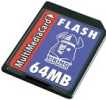 The communicators
support MMC cards for memory expansion. Nokia can sell you their
own MMC cards, but their prices for Nokia-branded cards are higher
than for standard cards. We've not heard of any incompatibility
with non-Nokia cards, so it's worth shopping around to get a third-party
card. Here are a few online options:
The communicators
support MMC cards for memory expansion. Nokia can sell you their
own MMC cards, but their prices for Nokia-branded cards are higher
than for standard cards. We've not heard of any incompatibility
with non-Nokia cards, so it's worth shopping around to get a third-party
card. Here are a few online options:
For more details, see our Memory Card page |
| Hotmail and AOL access? |
Hotmail and AOL use proprietary email systems,
as opposed to the more common POP email systems - this makes it tricky to access mail on a mobile device. For email on the move,
consider using a standard POP3 provider such as BT Yahoo (see setup details) that offers free email accounts that can be configured on mobile phone email programs.
For more help, see our Connected? page |
| Receive & send faxes on your mobile | If you need to receive faxes, but don't have access to a fax machine, take a look at efax.com. They'll give you a fax number, and forward faxes direct to your email account as an attachment. You can then use the messaging application to retrieve your faxes on the move. You can also use this service to send faxes. |
| FM radio? | Some mobiles come with a built-in FM radio. We're often asked whether software is available to add a radio to a phone that doesn't have a built-in FM radio. Unfortunately, it's not that simple, as it's not just a software issue. Phones that have built-in radios contain dedicated hardware in the phone to do this (an FM RF tuner)... and if your phone doesn't have this software, then you're out of luck. If you're really desperate to listen to radio from your handset, note that it is possible to listen to streaming audio over the Internet via GPRS, although don't expect the results to be up to much! |
| Can I use it as a modem? | Yes, using
Infrared or Bluetooth.
|
|
What's
my phone's serial number? |
From the front cover, enter '*#06#' as if it were a phone number, to get your handset's serial number (known as the IMEI) - useful to keep a note of in case your phone is stolen. You may also need this number when registering certain types of software. |
| Where's WAP? | On the Nokia 9210, a separate WAP browser was available on the Nokia CD. With the new communicators, the wap browsing is done using the supplied Opera Web Browser. For help on accessing WAP, see our Series 80 WAP page |
| SMS to PC? | If you're looking to copy your SMS text messages to a PC, you'll find that the Nokia PC Suite software doesn't support this. The best option is to try Oxygen II - This is an alternative PC Suite and supports copying of SMS, MMS and other message types, as well as a few other things that Nokia suite can't do. Take a look at our Oxygen page |
| Data conversion | For help with information on converting your Contacts, Calendar and documents for viewing on your phone, see our Conversion page for some general guidance. |
 Software
for Symbian OS phones is normally supplied using a Symbian installation
file (with a .sis extension). This is a single file that contains
the components needed to get a piece of software installed and
ready to run. A SIS file can be run on a Symbian phone (e.g. from
the Inbox or via a
Software
for Symbian OS phones is normally supplied using a Symbian installation
file (with a .sis extension). This is a single file that contains
the components needed to get a piece of software installed and
ready to run. A SIS file can be run on a Symbian phone (e.g. from
the Inbox or via a 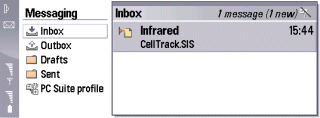

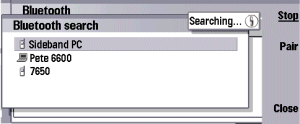
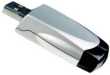
 Memory card reader.
If you don't want to beam files from your PC to the phone, another
option is to make use of the MMC card slot in the phone. Get
hold of a
Memory card reader.
If you don't want to beam files from your PC to the phone, another
option is to make use of the MMC card slot in the phone. Get
hold of a 
 Infrared
- The handset has a 'Modem' option under 'Connectivity'. Selecting
this option allows another device (such as a Pocket PC or Laptop)
to connect to the Internet using infrared. If the equipment
you wish to connect to doesn't have infrared, consider a 'USB-IRDA
Adaptor' from
Infrared
- The handset has a 'Modem' option under 'Connectivity'. Selecting
this option allows another device (such as a Pocket PC or Laptop)
to connect to the Internet using infrared. If the equipment
you wish to connect to doesn't have infrared, consider a 'USB-IRDA
Adaptor' from Need help? Please ask in our Series 80 forum
Bookmark this page:


