
This page contains information about the Psion / Symbian ER5 emulator – a PC application that allows you to run Psion applications and files
Symbian supply SDKs, which contain WINS emulators to allow development in a PC environment. For a full installation of the SDK, allow around 80MB. The ER5 SDK was developed for Windows NT, but will run on Windows
95/98/ME/XP. We’ve also been told that the ER5 SDK works on Linux using the Wine Windows emulator.
SDKs are available for developers using the C++, Java or OPL programming languages.
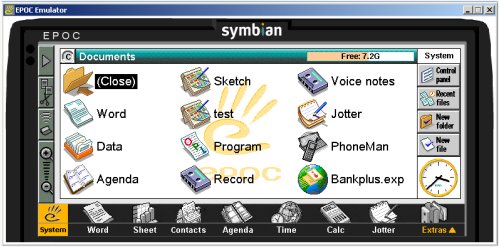
ER5 SDK, from Symbian
Where do I get the EPOC SDKs?
| OS | Availability |
| ER5 SDK (Series 5mx) | This is available as a free download from the Psion Teklogix site, after completing the free registration. There are different versions available depending on the required programming language: C++, Java and OPL. If you’re not a developer, and just want the emulator, best to go for the OPL version of the Symbian OS V5 SDK, which is a 27MB download – Teklogix SDK page |
| ER5 SDK (Revo) | Until July 2002, this was available free from the Symbian website (www.symbian.com/developer), as a 4MB file. A copy can be found here. See below for installation details |
| Quartz v6.1 | Available free from the Symbian website (www.symbian.com/developer). You must join the Symbian Developer Network, which is free and can be done online. |
| Series 60 (Nokia 7650) | Available on CD or for download from Forum Nokia |
| Nokia 9210 | Available on CD or for download from Forum Nokia |
Using
existing data on the ER5 and Revo emulators
If you have existing files or applications from a Psion, you need to move these to the appropriate folder on the PC, so that the emulator can find them. You’ll need to copy these files into the Wins\C folder (e.g. C:\Epoc32\Wins\C)
or the folders below this, such as the Documents folder. Then, when you start the emulator, the files will be recognised.
Note that the Contacts file resides in the C:\Epoc32\Wins\C\System\Data on the emulator, with a filename of contacts.cdb
Installing the Psion Revo SDK
The Revo SDK is also available from Symbian (see above).
- Firstly, you need to install the ER5 emulator. Refer to the readme.txt file supplied with the ER5 SDK. Files will be installed to the c:\epoc32\ directory
- Open the Revo SDK Zip file.
- Refer to the readme.txt file supplied with the Revo
SDK, as it contains some useful information. - Unzip the contents into the c:\epoc32\ directory, overwriting any files that are already in that directory. Ensure that the unzip program’s "Path information" or "Use folders" option is checked, so that the files get copied into the correct subdirectories.
- There are some changes that need to be made to your AUTOEXEC.BAT file. Again, see the Revo SDK readme.txt file for details.
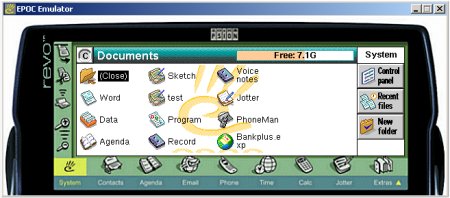
The Revo SDK
Note: If you want to use both the ER5 and the Revo SDKs on your machine, you will need to install the ER5 SDK twice, to different drive letters (see SUBST above). You will then need to copy the Revo SDK files over the top of one of the ER5 SDK installations.
Using more than one SDK:
Note
that the SDK uses the \epoc32\ root directory and it is not possible for two SDKs to reside in that directory. Accordingly, you may want to create a logical drive for the second SDK. This is best achieved using the DOS SUBST command, which can be used to tell your PC that a folder, say c:\revosdk is a drive letter, such
as H: To do this, try the following:
- From Windows Explorer, create a directory, such as c:\revosdk\
- From DOS (Start | Run
| "Command" in Win95/8/ME), use the SUBST command to map this directory to, say, the H: drive (e.g.: SUBST H: C:\revosdk) - When you install the second SDK, install it to the H: drive.
Note: To start the emulator, you normally run the file e32-sys.bat from the \epoc32\Tools directory. If there are two installations, you will normally need to run the SUBST command each time you start the emulator that is not located in the c:\epoc32\ drive. You may wish to add the line ‘SUBST H: C:\revosdk’ (Where ‘revosdk’ is the name of the directory that the SDK was installed to) to the top of the batch file.
Older
emulators
If you’re looking for older SIBO / OPL16 emulators, such as the Series 3, Series 3a, Workabout and Siena emulators, here are a few resources:
- Psion Series 3a emulator – Available from Psion’s website
- Other
older Psion emulators
Other useful information
- The executable for the emulator is EPOC.EXE
- The emulator settings are in a file called epoc.ini, usually in \EPOC32\Data. Full details of the options available are in the HTML documentation supplied with the SDK
- The
emulator build is known as WINS (a Single process Windows platform). It differs from the MARM build found in EPOC devices with the ARM processor, such as the 5mx and Revo. For this reason, some files and components will only run on either the MARM or a WINS platform, and not both. A "Not found" error is likely if attempting to access a file built for the wrong platform. - Additional information can be found in the SDK help files, which are in HTML format and can be found in the \sysdoc\emul folder.
- Support for the ER5 SDK should be sought from Symbian via www.symbian.com/developer.
Symbian cannot help with Revo SDK issues. These should be addressed to Psion via revosdkhelp@psion.com. - If you make regular use of the EPOC emulator, AlarmPlus helps you retain your system settings.
Related Psion Articles
- Psion Information
- Psion F.A.Q – Your Series 3, Series 5 and Revo Questions Answered
- Psion Forum – One of the last remaining placed online to discuss your Psion device
