



Voice Over IP: Using Skype
OK - So you've heard about Skype and Voice-Over-Internet... but what's it all about? On this page, we take a look at Skype, the leading Voice-Over-IP provider, and see what the service has to offer.
Why use Skype?
Here's a summary of the benefit of using Skype:
- Free voice calls to other Skype users (PC-to-PC) over the Internet
- Low-cost calls to landline and mobiles (your call is routed over the Internet, and converted to a telephone call for the last leg of the journey)
- Your own phone number that allows calls to be made to your computer from any phone in the world
- Voicemail - Delivered to your computer
- Instant messenger service with other Skype users
- Video calling / conferencing
Using Skype Out to make an outgoing call to the US would cost 1.4p per minute - on BT Together, this would be between 9p and 15p depending on the time of day. Calls to other countries are similarly low, and it's possible to achieve such rates as the call is routed over the Internet for the transatlantic link, with only the local leg over the public phone network.
How do I use Skype?
The basic Skype service is subscription-free, and calls to other Skype users are also free. You'll have to buy credits in advance before you can dial from your PC to landline or mobiles.
Here's what you'll need to get started:
| Computer | A computer capable of running Skype's software |
| Internet | An Internet connection. A dialup account or GPRS on a mobile will work, but for best results, you'll want Broadband Advice |
| Software | Free from Skype (see below) |
| Headset |  You'll need headphones and a microphone to do voice calling. A more elegant solution is a dedicated Skype handset (approx £25). You'll need headphones and a microphone to do voice calling. A more elegant solution is a dedicated Skype handset (approx £25). See Dabs.com, Amazon, Maplin or PC World for a good selection. |
Here's how you get started with Skype:
- First, you'll need to download the Skype application from www.skype.com
- Once you've installed the application, you'll be prompted to create a Skype account (you'll need to create a username and set a password)
- Next, you can run through the optional setup wizard - this will let you configure your microphone settings, and to import contacts for you - this last step is quite useful - it scans your Outlook address book and sees if any of your email contacts happen to have a Skype account.
- Then, you're up and running... find someone with a Skype account, and get in touch!
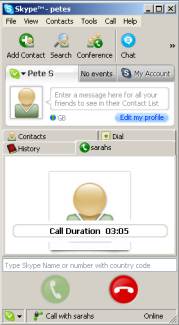
The main Skype screen
Dialling a phone number
Contacting other Skype users for a PC-to-PC text, voice or video chat is all well and good, but what about dialling landline and mobiles? As we've established, calling from Skype can be a lot cheaper, especially if you're calling overseas. To make a call, you'll need to use either a headset/microphone, or a USB VoIP phone handset. You'll also need to buy some credit (think Pay as You Go top up). Then, it's a case of dialling the person's landline or mobile, and chatting away.
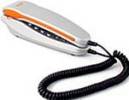 Instead of using your PC soundcard and headset, consider a Skype handset - either a wired USB phone, or a cordless phone.
Some useful links:
-
Top up your credit at www.skype.com.
- Skype and other VoIP apps featured in Show 08 of our podcast
- Buy a headset or handset from Amazon, Maplin or PC World
Skype on a mobile phone
Forget paying expensive mobile phone charges - consider getting a Skype client for your mobile phone and using your phone's Internet or wi-fi connection to make calls over the Internet.
Skype clients are available for Windows Mobile handsets (see below).
Some phones, such as the Skypephone and INQ1 come loaded with Skype as standard.
 iPhone: A Skype application is available for the Apple iPhone, although note that o2 in the UK block its use on their network (after all, free calls on the free Internet doesn't do o2 many favours). You can use the Skype app on a Wi-fi network though.
The app is available for free from iTunes App Store
The Skypephone:
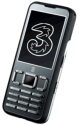
Pictured here is the Skypephone S2, an updated version of a handset released at the end of 2007. The Skypephone lets you make free Skype calls to other Skype users. It's got an MP3 player, 2 Meg camera, Internet, email and Bluetooth
Available free on contract, or under £80 on pay-as-you-go. Great for free calls over Skype to the 170 million Skype users around the world. FREE calls to anyone, anywhere at anytime.
More details on 3's Skypephone page. We've also reviewed the Skypephone.
Skype on a Windows Mobile
You can also download a version of Skype for your Windows Mobile Pocket PC. Go to www.skype.com.
This works rather well, and the client for the Pocket PC offers similar functionality to the PC version - including voice calls and instant text messaging.
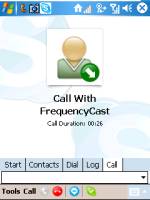

If you have a GPRS-enabled mobile phone, using Skype may work out cheaper than making an international call, and there's the option of Skype'ing on the move. Also, if you have a wi-fi network at home, your Pocket PC becomes your cordless phone or portable instant messaging solution.
- More on the Pocket PC
- More on wi-fi with a PPC
- More on GPRS, Pocket PC connectivity and Windows Mobile connectivity
You can also use Skype on some mobile phones on the 3 network. See www.three.co.uk/xseries for details of their X-Series, which includes Skype on a Symbian mobile such as the Nokia N73
Common Skype questions
| How do I make calls out? |
|
Multiple Skype accounts |
We've been asked whether it's possible to have multiple Skype accounts on a single PC - for instance where more than one family member access a shared computer. This is possible, and here's how to do it: You don't need to install multiple versions of the software. It's a case of creating a Skype account for each user, and then using the Skype software on your PC to sign in to the correct user when appropriate. Select "File" then "Sign Out" to get out of an account - you'll then have the option to switch to a different use, or add a new Skype ID. |
| Test call | 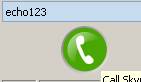 Skype has a test call number, so that you can check your audio settings. From the Skype application, go to the dialler, and type "echo123" in the dialer box, then press the green phone icon. You'll be connected to the Skype test account, and will be prompted to leave a test message. This will then be played back to you, so that you can hear how you sound. Skype has a test call number, so that you can check your audio settings. From the Skype application, go to the dialler, and type "echo123" in the dialer box, then press the green phone icon. You'll be connected to the Skype test account, and will be prompted to leave a test message. This will then be played back to you, so that you can hear how you sound. |
Got a question, or need help? Contact us, or ask in our forum |
Bookmark this page:


