



Sky Broadband Explored
information on Sky Broadband, the broadband service from digital TV provider Sky
 Why Sky Broadband?
If you currently get your digital TV from Sky, then getting your Broadband from Sky as well is a great way of saving money. If you're with Sky for your telly, then it's well worth considering Sky's current Unlimited Broadband offer
Signing up is easy, Sky will send you a free Sky Hub (their wireless broadband router, pictured below), and you can transfer your broadband to Sky online with minimal fuss.
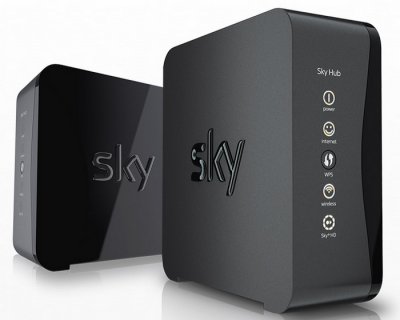
For full details of Sky Broadband, go to sky.com/shop/broadband-talk
Summary of benefits:
- No limits on downloads with Sky's unlimited Broadband or Fibre package
- Free Sky Hub - This wireless router combines Sky Smart Signal to find the best wi-fi channel, and switches to an eco power setting when not in use - and it's perfect for Sky's On Demand TV service
- Free Sky WiFi at over 20,000 locations
- Sky Yahoo Email
- Sky Broadband Shield, to filter sites you'd rather your family don't see
- 24/7 technical support
Sky Broadband Packages
|
|
|||
|
Sky Broadband Unlimited |
Up to 17 Mbps | Unlimited | Sky deals are changing all the time. Here's their current best Broadband deal: To see what other deals are on offer, go to sky.com/shop/broadband-talk |
| Sky Fibre | Up to 38 Mbps | 25GB / month | |
| Sky Fibre Unlimited | Up to 38 Mbps | Unlimited | |
| Sky Fibre Max | Up to 76 Mbps | Unlimited |
At the time of writing, prices include Sky Line Rental, which is £18.99 a month.
How do I get Sky Broadband?
You can sign up to Sky Broadband at sky.com/shop/broadband-talk
If you're looking to switch from a rival broadband provider, see Sky's Switching Guide
Sky Broadband Wireless Router
To use Sky Broadband, you're provided with Sky's Broadband router, known as the Sky Hub. This plugs into your phone line, and lets you connect computers to the Internet.
The router allows you to connect computers via an Ethernet cable (4 ports available), or to use a wireless (wi-fi) connection.
Sky Hub Broadband Wireless Router (Front)
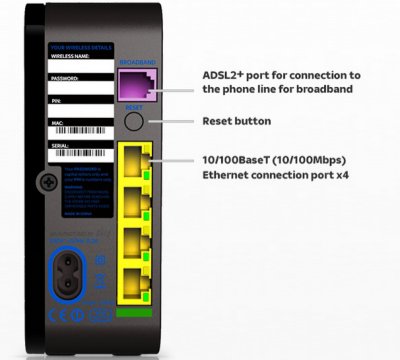
Sky Hub Broadband Wireless Router (Rear)
Setting up the Sky Broadband Router
The Sky Broadband router doesn't actually need much setting up - Plug it in to your phone line, then plug in your computer or laptop.
If you want to set it up for wi-fi, then you'll find the SSID and Security key you need on the bottom of the router.
If you're more of a techie, and want to alter the security settings, change password or make any advanced changes, then you can get to the settings on the Sky router via a web browser.
Sky Broadband Server Information
| Username / login name: | yourusername@sky.com |
| Incoming (POP3) email server address: | pop.tools.sky.com |
| Outgoing (SMTP) email server address: | smtp.tools.sky.com |
For help with Sky Broadband email settings, see our UK Email Settings page
Sky Broadband Frequently asked questions
| How do I get an account? | You can sign up for a Sky Broadband account by going to the following web address: sky.com/shop/broadband-talk |
| Customer Support | To contact the Sky Broadband technical helpdesk, call 03442 411 653 |
| Connection Problems |
Having problems with Broadband? See our Broadband Problems section |
Got a question? Ask in our Broadband forum
Bookmark this page:


