



Onspeed Review - Speed Up Your Internet
Here, we review a clever solution called Onspeed - a quick and easy way to speed up your existing Internet connection without having to change suppliers
If
you're not able to get Broadband Advice where you are and still want to get
the speed benefits of a Broadband connection - or you're looking for
a faster connection without the Broadband outlay - you might want to
take a look at the service from OnSpeed.
OnSpeed offers a service that optimises downloading of pages and images over the Internet. Basically, you install a small piece of software onto your PC or Mac, and when you connect, web content is compressed before it's delivered to you, giving you the feeling of a much faster connection.
If you are still running on the old dial-up connection service, the speed difference with this service can be dramatic. It could increase your speed by up to 10 times, and on a PC, can also speed up your email too. To use it, you'll need to download the special software from www.onspeed.com. Once installed, you won't even notice it's there, it runs in the background speeding up your Internet connection and compressing data automatically.
As well as being useful on slow home connections, OnSpeed can also help you to speed up a Mobile Broadband connection (and can also keep the costs down!)
A closer look at OnSpeed
We first gave OnSpeed a try way back in 2005, as part of a review for Palmtop User Magazine (On The Net issue 11) to see if it lived up to the claim of speeding up an Internet connection. Some years ago, Internet accelerator programs were all the rage, and many of them didn't live up to their promise. We're glad to say that OnSpeed actually does what it says on the tin. Of course, we now have Broadband here in the office, but we still see a noticable speed improvement on our 4Mbps connection - we tested using the ADSLGuide Speed check.
How OnSpeed works:
To get the benefits of a faster connection, it's a case of signing up to their service (around £2 a month). If you're unsure, note that they offer a 14-day money back guarantee. Once signed up, you download a small application (under 1meg), which puts a green dot in your Windows System Tray, and then enter your account username and password. When you connect to the Internet, the OnSpeed application wakes up, and starts doing its magic by compressing text and images before they're received on your desktop

The OnSpeed Green Dot
You can see how much of a speed increase you're getting by right-clicking on the green OnSpeed icon, and selecting the Statistics option (example below)
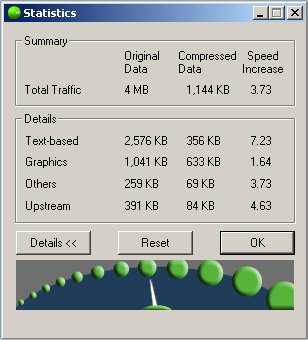
An hour or so of solid surfing over a dial-up connection later, and all was well - no crashes or problems with page loading, so we ended our trial and put back in the Broadband Advice plug, to find that OnSpeed carried on compressing content for us, although the real-world saving weren't that noticeable.
OnSpeed Mobile
OnSpeed also offers a version of their solution for use on a range of mobile phones, including Windows Mobile , Windows Smartphones, and Symbian Series 60 devices.
We tested OnSpeed using a Windows Mobile / Pocket PC version of their software, trying this out with our trusty old iPaq rx3715 and a Bluetooth connection over o2's GPRS data service. Using Bandwidthplace as a guide, we saw just over a twofold speed increase over a standard GPRS connection, and the browsing experience did seem snappier, especially on image-heavy content. Impressive stuff.
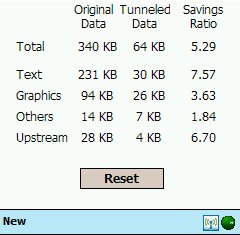
Speed-up on a Pocket PC with GPRS
Summary
All-in-all, our verdict is that if you have a slow connection - OnSpeed is well worth a try, and offers good value for money for those without a broadband connection. It also comes with a built-in popup stopper, and a performance monitor. Give it a go, and remember their 14 day money back guarantee if you're not happy with the results.
Download the
OnSpeed software from
www.onspeed.com
Bookmark this page:


