



Online Backup Services
On this page, we look at online backup services. In the UK, there are a small number of firms that offer services to backup your PC data safely on secure web servers... We take a look at two or three of one of the UK's providers

Feature: Backup your audio and videoIn Show 47 of our tech podcast, we looked at various ways to back up your data, including using online services. Take a listen to hear our findings. Also, back in Show 21 of our podcast, we looked at backing up your audio and video to PC. |
How to take backups - Podcast feature in FrequencyCast Show 47
 Norton Online Backup
This backup service from Norton supports 5 computers and secures up to 25GB of data. It offers automatic backup, scheduled backups, alerts. Restore individual files, folders or an entire backup. Also access files securely from any web browser.
Norton Online Backup costs £49 a year for 25GB and is available from Amazon.co.uk
Acronis Online Backup
Simple, automated and secure online backup. Install the software onto your PC, and up to 250GB of data will be safely backed up online.
Recover files from multiple points in time, and access your files over the Internet.
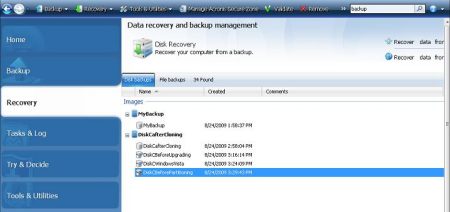
Very reasonably priced, and available on up to 5 home computers. More on Acronis Backup
A free trial is available from www.acronis.co.uk/homecomputing
Carbonite Online Backup
This lets you back up important files from a PC or a Mac. Unlike many such services, there's no limit on the amount of data you can store. It's secure, and at the time of writing, it costs $55 a year to keep it all safe.
The current version of Carbonite is designed for Windows XP and Windows Vista. Mac OS 10.4 and 10.5 are supported. it won't run on Windows 98, Windows 2000, and Windows ME.
A free 14 day trial is available at www.carbonite.co.uk
 Tech Guys Data Vault
Data Vault allows you to automatically back up and synchronise files, edit Microsoft files without having to install MS Office, play music and videos through any PC via the Internet.
The service offers unlimited storage for £89 a year.
The Tech Guys Data Vault service is available from PC World
PC World Spare Backup
PC World Spare Back-up service offers you a free 14 day trial and then get 50GB of data back-up for just £7.99 per month. Once Spare Backup is installed, backups are automatic, you don't even have to select files for backup, as the files are selected automatically.
More details: Spare Backup
DataBarracks Review
Until July 2006, we were using, and recommending, DataBarracks for online data backups, however following some problems using the service, we've switched away. When we signed up in July 2005, we performed automated backups using their software package DatBar, but this migrated to DBVault SE.
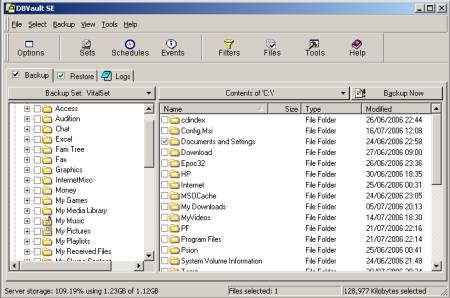
Databarracks DBVault application
In our year with Databarracks, things have generally been smooth, and we've had good service from them, especially from their technical support people. We only had a couple of minor issues, but these were resolved swiftly with their Technical Support team. In June and July 2006, we hit some usability problems with Databarracks' service, and this caused us to shop around for an alternative. Here's are some notes on our experience:
- Charges - We signed up to the 1 Gigabyte service, and all worked well, until our automated backup tipped us a few meg over this limit. Without notice, our monthly fee doubled, and we didn't find out until our next billing cycle and the cash was taken from our account. Databarracks told us that where possible they try to notify customers, but acknowledged that didn't happen in either of the times that we exceeded our limit. Apparently, you can request a 'cap', but as this option doesn't appear in their software, the Terms and Conditions, or the product documentation, we weren't aware of this.
- Deleting data - We tried to find out a way of deleting some of the server-side data to bring us down to the lower price limit, but the software didn't offer an obvious way to do this. When Databarracks contacted us to discuss our review of their service, they were quick to point out that there actually is a delete option, and to point us at a PDF file outlining how to delete. However, the PDF file that they pointed us at, the application's help, and the software instruction manual all failed to point out that the software interface tucks the delete functionality away where you least expect it - There's no 'Delete' menu option, or anything hyper-useful like that... you have to go to the menu, choose 'Select' > 'Get Volume List from Server', then press on the little icon of a red cross. We're adding this information to our review here, to help anyone else that may have difficultly finding this functionality.
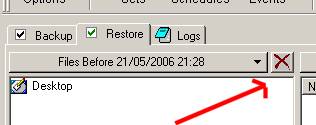
The non-obvious Restore/Delete toggle - Login: Online logon via the Databarracks website broke for us in 2005 - we tried a number of times to ask DataBarracks to fix this problem - but no joy. We later discovered that the login isn't for customers, it's for Databarracks resellers. Databarracks has acknowledged that this isn't clear, and hopefully they'll address this. There's a different login screen on the same page, but this didn't work for us either, and rather unhelpfully, the login box doesn't have any field labels to tell you what information it's looking for:
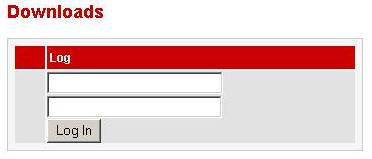
Databarracks rather unhelpful login screen
- Accessibility: After a hard-disk update, we tried to re-install DataBarracks, but found that their software client isn't directly available for download on their site. We had to mail Technical Support to get a pointer to their hidden downloads page, as they keep this hidden to prevent hackers playing around with their software. When we were able to download and install the software - we found that the software wasn't preconfigured with the vital DataBarracks server address settings (apparently for security reasons) - so yet another mail to Support was needed...
- Restrictions: Finally, when we did reinstall the client, the system refused to let us perform a backup or restore, as the DataBarracks service doesn't allow multiple hard disks on a single account, for "security reasons". This restriction didn't seem to be documented either - we've since been told that customers need to contact Support should they wish to restore data onto a new hard-disc. Don't misunderstand, we've not had a problem with their Support team, who've been very helpful, but the process of having to call Support every step of the way was a little frustrating. We gave up at this point...
At each step of trying get our service working (size limit, software, settings, drive), we needed to contact Support, who, to be fair, were very helpful , but the barriers to getting the service working, apparently put in place for security reasons, frustrated us to the point of looking for an alternative provider. We cancelled our account, and asked not be have our account debited for the time that we were unable to use the Databarracks service and software. Their response: "Unfortunately we're unable to provide a refund as we've been holding data from your account in our servers for the whole period".
We agree - they were indeed holding our data - but if we couldn't use the service, access our account, or do a restore, we don't think we were getting the service we'd paid for.
Update Aug 2006: Following our request not to have our account debited whilst in dispute, Databarracks stopped returning our emails, and debited our account regardless. After Databarracks stopped returning our emails, we were contacted by DataBarrack's MD. He'd seen our revised review online, and read our comments about our recent experiences. After revisiting our review, perhaps we were a little harsh, and Databarracks also expressed a concern that they felt our review was in some way critical of the technical support we'd received. We've now amended the review to make it clear that the technical support we received wasn't what we were faulting here. For the record, in the year that we've been with Databarracks, we've been very happy with the speed and quality of the Tech Support we've received, and we've never had need to complain about the technical support team, or the actual backup service - Support tried their best to assist us over the usability hurdles, and to help us where the documentation was lacking. We still feel justified in pointing out a number of usability issues, some of which Databarracks has acknowledged, and some of which we've reiterated to their management, as constructive criticism.
We'd like to thank Databarracks senior management for getting in touch as a result of this review, after other lines of communication had failed. Databarracks clearly prides itself on the technical aspects of their service, and we respect that.
We still feel, however, that where a customer is in dispute with an invoice, and requests that their bank account isn't debited until resolved - ignoring this request (and other emails) and debiting a customer's account regardless, isn't great customer service. Because of this, a year of previously positive support for DataBarracks has been flushed away - all over less than £20.
On the 14 Aug 06, we heard back from Databarracks, and understand that, under the circumstances, we'll be getting a refund, and also that some of our issues around product usability, website accessibility and shortcomings in the product documentation may be addressed, to hopefully benefit other users of their service.
PC Fort Review
After our experiences with Databarracks in July 2006 , we shopped around, and found PCFort - This firm offers a broadly similar online backup service, and also provides a software tool that runs in the background and performs an automatic backup to secure servers. We feel that their offering is a little more consumer-friendly, and pitched at a better price range than DataBarracks current offering. Below is a comparison of the current data backup services, correct as at 1st August 2006.
Databarracks has asked us to point out that they'll be launching a cheaper service at some point in the future. We've asked Databarracks to let us know when their service becomes available, so that we can update the above table.
Below is a screenshot of the PCFort application running:
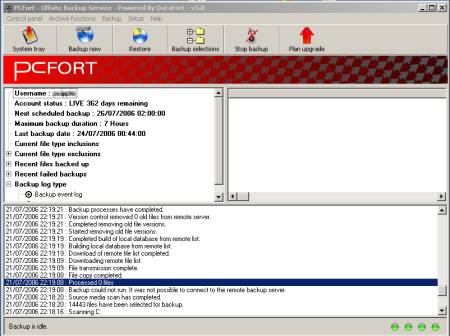
The PC Fort Application
We've now been with PC Fort for a few months and our impressions are good - the service presents information about recent backups in a far more user-friendly format, and makes it clear how much space you've used. They also don't sting you for going into a higher usage - they notify you that a backup would take you over your data limit - a much fairer option, we feel.
If you're interested in trying an online backup service, give it a try - Go to www.pcfort.co.uk (a free trial is available).
  PODCAST FEATURE: Data Backups: We looked at ways to back up in show 47. PODCAST FEATURE: Data Backups: We looked at ways to back up in show 47. Listen to the show online, or download it to your MP3 player. Listen to Show 47 | What is FrequencyCast? | Add us to iTunes |
Bookmark this page:


