
One of our PCs here at FileSaveAs has been running a little sluggish of late – probably something to do with the dozen or so apps running in the background. As it’s a quiet Bank Holiday weekend, seemed a good time for a tidy-up, and to consider a RAM upgrade.
Upgrading a PC’s RAM is actually fairly straightforward if you’re comfy undoing the cover of your desktop and swapping some memory modules – the hard bit is making sure you get the right type of chip. Types include DDR, DDR2, SDRAM, EDO… and you need to get the right combination.
Doing a Google for reputable RAM suppliers threw up the name Crucial, so we thought we’d give then a try – and we found their “System Scanner tool“. A little dubious, we gave it a try, and the results were a) spot on, and b) very clear – which we liked:
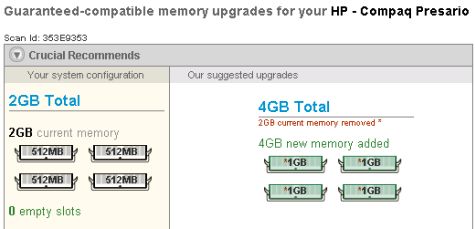
We’re then shown the tech spec with more detailed information about our current RAM, what’s possible, and if there are any alternatives.
Should you decide to proceed with an order for more memory, the RAM they recommend is guaranteed compatible, and there’s free delivery. We’re impressed.
Give it a try for yourself at crucial.com/uk/systemscanner
More: PC Memory Advice

I have a 16GB easyram memory stick and operate windows vista when I put the stick into the computer it recognises the new hardware but does not connect to the softwear, I have tried connecting to my laptop whick also operates vista and have no problem
Why can I not connect up to the PC