
Top Links


6220 Software
Discuss the 6220
Series 60 FAQ
Email setup
PC connection
Data conversion
Nokia N Series

Mobile Travel
Bluetooth
SMS
MMS
GPRS
Mobile FAQ

Updates by email


FileSaveAs News Feed Follow FileSaveAs on Twitter FileSaveAs Tech Podcast

FrequencyCast UK Tech Podcast


Nokia 6220 Help and Advice

This page contains information, help and advice on the Nokia 6220 Classic handset.
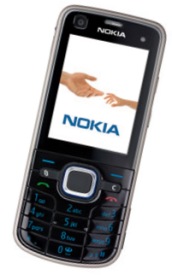
 

Nokia 6220 pic

The Nokia 6220 Classic is a combined quad-band, 3G mobile phone, with a 5 megapixel digital camera and GPS.

The Nokia 6220 Classic uses the Nokia Series 60 platform (powered by Symbian OS v9.3).

Dimensions: 108 x 46.5 x 15.2mm (90 grams)
Screen: Colour, 240 x 320 pixels
Powered by Symbian Series 60 (third edition, feature pack 2)
Memory: Up to 256 Meg internal memory, with microSD expansion

Features:

  • GPS - Onboard satellite receiver for satellite navigation.
  • Connectivity: USB, Bluetooth, GSM, WCDMA and HSDPA.
  • 5 megapixel camera, with Carl Zeiss optics and a Xenon Flash
  • Has a stereo FM radio with RDS
  • TV Out socket

Discuss the Nokia 6220 in our Nokia Series 60 handset forum


UK Availability: Now (became available in July 2008)

Know a better online deal?


Listen to the FrequencyCast UK online radio show
FrequencyCast PodcastPODCAST FEATURE: We featured the Nokia 6220 in Show 30 of our online tech radio show.
Listen to the show online, or download it to your MP3 player.

Listen to Show 30 | What is FrequencyCast? | Add us to iTunes


Nokia 6220 FAQ

Answers to common Nokia 6220 questions, here we answer your questions on the Nokia 6220 answered:

Accessories?

There's a wide range of accessories, including spare batteries, cases, chargers, in-car kits, hands-free units, data cables and fascias, available at Carphone Warehouse and MobileShop.

If you're looking for authentic Nokia spares and accessories, try the Nokia UK Store.

PC Connectivity

If you want to connect your 6220 to your PC for data transfer, the options are:

  • Cable - Use the supplied USB cable to connect to your PC. The cable is terminated with a Micro-USB connector. The lead is a CA-101 ,and you can save some cash by picking these up very cheaply on eBay.co.uk
  • Bluetooth - If your PC is Bluetooth-enabled, you can connect from the Nokia 6220's Bluetooth service. You can get a cheap USB Bluetooth adapter for your PC. Bluetooth help.

You can connect using the Nokia PC Suite supplied on CD with the 6220. Alternatively, you can use a third-party application called Oxygen II.

Email from your 6220 If you're looking to use your Nokia 6220 for sending and receiving e-mail, see our Series 60 Connect page.

Where can I find 6220 software? If you're looking to enhance your Symbian phone by adding new software, take a look at Handango. for a great collection of add-on software, utilities, applications and games for this phone.
For ringtones, wallpapers and Java games, try Jamster.

wi-fi access on the 6220 Sorry - no wi-fi wireless connectivity with the Nokia 6220.

Extra memory for 6220

microSD card The Nokia 6220 supports microSD cards for memory expansion. Nokia can sell you their own microSD cards, but their prices for Nokia-branded cards are higher than for standard cards. We've not heard of any incompatibility with non-Nokia cards, so it's worth shopping around to get a third-party card. Here are a few online options:

  • Amazon - Always a good choice for reliable delivery at good prices
  • Jessops - Stockists of low-priced memory cards and accessories. Worth a look as their own brand of cards, for photographic use, can be cheaper than those on PDA sites TIP
  • eBay.co.uk - bid for new cards at low prices!

For more details, see our Memory Card page

Can I use the 6220 in the States?

Yes. The Nokia 6220 is a quad-band phone operating on EGSM900/1800 (Europe, Africa, Asia Pacific), and EGSM 850/GSM1900 (USA, Canada, South America).

There should be no problem using the Nokia 6220 with network operators in these countries. Roaming restrictions from your network operator may prevent use of some services in other countries.

Print out your photos

Polaroid PoGo PrinterIf you've taken some pictures of your chums with your phone's camera - here's a good way to share - Get the Polaroid PoGo - No messy ink cartridges, use your phone's Bluetooth to get instant prints with this portable, rechargeable Bluetooth printer.

See our Polaroid PoGo Review for more.

Receive faxes on your mobile

If you need to receive faxes, but don't have access to a fax machine, consider Mobile Fax - this is a small application for Series 60 phones that supports sending and receiving of faxes. For more details of this clever package, see Mobile Fax.

Alternatively check out how you can send and receive faxes by email, with efax.com.

What's my 6220's serial number? Enter '*#06#' as if it were a phone number, to get your handset's serial number (known as the IMEI) - useful to keep a note of in case your phone is stolen. You may also need this number when registering certain types of software.

Recycle your mobile

Recycle your mobile phoneIf you've got an old mobile phone handset that you're no longer using... do your bit for the environment, and recycle it safely. You'll also make some money when you send your old handset back.

Don't leave it in the back of a drawer - see if it can find a new lease of life, and pocket you some cash.

For a summary of the best deals on making cash from your old handset, try the comparison search too at www.sellyouroldmobile.co.uk

Copy to memory card For details of how to copy files to/from an installed memory card, see the answer in our Series 60 FAQ.

Data conversion For help with information on converting your Contacts, Calendar and documents for viewing on your phone, see our Conversion page for some general guidance.

Various 6220 codes: Below is a list of the various code types you'll find on the Nokia 6220:

Lock code
  • Length: 5 digits
  • Detail: Prevents access to certain functions on the phone
  • Set from: Tools > Settings > Security > Phone & SIM
  • Default: The default lock code for Nokia Series 60 devices is 12345.
  • Lost? - If you've changed this code and forgotten it - you will need to visit a Nokia authorised service centre, who will be able to reset the lock code for you.
PIN code
  • Length: 4 digits
  • Detail: This is an optional 4 digit code to protect your SIM
  • Set from: Tools > Settings > Security > Phone & SIM
  • Lost? - If you keep trying, you'll eventually get locked out and need to contact your network operator for a PUK code (see below)
PUK code
  • Length: 8 digits
  • Detail: You'll be asked for this 8 digit code if you've entered the wrong SIM code more than the allowed number of times. You'll need to contact your network operator to get this lock lifted.
Network locking code
  • If your phone was fixed to work on a specific network (for example, Orange), this lock may prevent you from using another SIM in the handset. You may see "SIM card rejected" or "SIM card unaccepted". This lock can be lifted for you by contacting the network operator in question (there may be a fee for this).

Memory Card lock code

  • Our forum often gets messages from people that are seeing "Memory card locked". This means that your microSD card has had a password set on it. If you know the password, and want to remove it, go to Tools > Memory.
  • Lost? - Sorry, but we don't know of a way to remove this code. The advice we've seen via our forum suggests that you may want to format your memory card either from the Tools > Memory > Options > Format mem. card, or using a PC Memory Card Reader. If you know of a better solution, please pass this on via our forum to help others that have managed to lock themselves out of their cards!

We have the answer to lots more Series 60 questions on our Series 60 FAQ

Other useful links


Want to talk about the Nokia 6220? Please use our forum, or leave a message on our Podcast Podline, 0208 133 4567


Is this page correct? Something out-of-date or broken? Report a page error.
Please help us correct the problem and to keep this site up-to-date.

If you're looking for help, please don't use this option - instead use our forum


Bookmark this page: deliciousDel.icio.us | diggDigg | stumbleStumbleUpon | technoratiTechnorati | facebookFacebook