

Top Links


Mobile Internet
GPRS data
3G data
Email settings
Connecting PDAs
UK Mobile FAQ
Mobile wi-fi
Internet abroad

Broadband Info
BT Broadband
Virgin Media
Dial-up access


Broadband help


Updates by email


FileSaveAs News Feed Follow FileSaveAs on Twitter FileSaveAs Tech Podcast

FrequencyCast UK Tech Podcast


3 Mobile Broadband Explored

This page contains information on how to use 3's Mobile Broadband service for Internet access on a laptop. We're using UK network 3's ZTE USB Modem

3 Mobile Broadband:

Network Operator 3's main selling point is their 3G Internet connectivity, and it's not surprising that as well as offering Internet-enabled mobiles, they also offer connectivity for laptops and desktops. 3 offers a range of USB 3G modems to connect into a USB port and provide a wireless broadband service.

With 3, you can choose to get a USB dongle on a contract (from £10 a month), or on a pay-as-you-go basis. Packages range from 1 gig to 15 gig a month download limits.

3 offers a range of mobile dongles. On this page, we look at the ZTE model. For the full range, go to 3's Mobile Broadband section
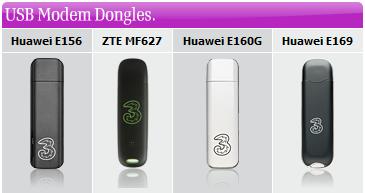
3 Broadband Dongles


ZTE USB Modem Review

Network operator 3 is well known for its data network, and they offer a decent Mobile Internet offering ideal for web surfing and email on the move. Here's a quick review of one of 3's USB dongle modems, the ZTE Mf622.

The ZTE USB modem offers speeds of up to 2.8 Mbps, and is compatible with Windows XP, Windows 2000, Windows Vista and Mac OS.

You can get this modem on contract from £10 a month (with a 1gig a month download allowance) - packages offering up to 15GB a month are available.

On contract, you can get the modem for free, or buy the modem outright for £49, and go contract-free, surfing on a pay-as-you-go top up basis. More at 3's Mobile Internet site.

ZTE MF622 USB Modem
The ZTE Mf622 USB Modem

Using the ZTE is pretty straightforward. Out of the box, you need to insert the supplied SIM card, then use the supplied USB cable to connect the modem to your laptop.

When we opened our ZTE box, we expected to find a software CD included, but there wasn't - it's more clever than that. The modem has some onboard storage, and when you first connect it to a PC, plug-and-play kicks in and an Autorun program starts up and installs the modem driver and connection program.

Once installed, you'll find a 3 Internet application waiting for you - opening this program gives you a screen (pictured below) that shows your signal strength and lets you make a connection.

3's connectivity application

Getting up and running was surprisingly simple, and as we were in coverage of 3's HSDPA high speed data network, we got a decent connection speed with minimal fuss. All in all, we're very happy with the results. More details

Something we've not covered? Get in touch and we'll try to help.


3's 3G USB Modem Availability

Available on 3 Broadband to Go. These USB dongles are available on three different packages: Lite, Plus or Max. These contracts offer download limits of between 1GB and 15GB a month.

Prices start from £10 a month on contract for Mobile Broadband. A free USB modem is supplied.

A pay-as-you-go version is also available - the modem costs £49 and you top-up like you do with a PAYG mobile.

Go to www.three.co.uk for more on 3's USB modems and tariffs, and to order.

3's ZTE USB Modem package


ZTE USB Modem - Common questions:

  • 3 USB Modem on PAYG? Want to sign up to "My Three" so you can check your account online? You'll need the MSISDN (phone number) from the case the modem came with, and to pop out the SIM Card to get the last 6 digits of your SIM card. Enter these details in My Three, and a password will be sent to your modem. Make sure the modem's connected to your PC, and a text message appears in the 3 Internet application message folder.

    Got a question on the ZTE USB modem, or mobile Internet access in general? Need a little help or advice? Get in touch and we'll try to help.
Listen to the FrequencyCast UK online radio show
FrequencyCast PodcastPODCAST FEATURE: USB Modems: We looked into USB modems, in show 27.
Listen to the show online, or download it to your MP3 player.

Listen to Show 27 | What is FrequencyCast? | Add us to iTunes


Got a question about USB Modems or Mobile Broadband? Ask us!


Useful Mobile Broadband Links:


Is this page correct? Something out-of-date or broken? Report a page error.
Please help us correct the problem and to keep this site up-to-date.

If you're looking for help, please don't use this option - instead use our forum


Bookmark this page: deliciousDel.icio.us | diggDigg | stumbleStumbleUpon | technoratiTechnorati | facebookFacebook