



Nokia 3650: Using WAP
Help and advice on how to set up a WAP connection on a Nokia 3650 WAP handset, from the team at FileSaveAs
If you have a Nokia
3650 Smartphone, you'll find a built-in WAP browser ('Services"
from the main menu).
The advantages of the large screen and keyboard one-box solution are
obvious.
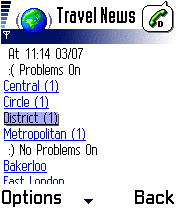
The Nokia 3650 Wap browser | 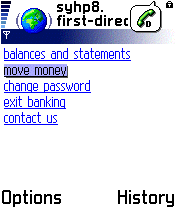
Banking on the move |
Setting up O2 WAP on a Nokia 3650
 This
page gives information on how to set up your phone for WAP access with
UK mobile phone operator O2
online
o2 offers up to 1000 free SMS messages and an inclusive
GPRS WAP allowance. We have settings for other UK network operators on
our WAP page.
This
page gives information on how to set up your phone for WAP access with
UK mobile phone operator O2
online
o2 offers up to 1000 free SMS messages and an inclusive
GPRS WAP allowance. We have settings for other UK network operators on
our WAP page. To get o2 WAP access, you need the following:
You need to decide whether you're going to connect using a dial-up service,
or GPRS. All WAP handsets can cope with dial-up, and o2 online allow an
amount of free dial-up WAP access with their tariffs. GPRS offers an always-on
connection, and you're charged for the amount you download, not the length
of time you're online. For details of GPRS, see our GPRS
page.
To set up o2 WAP access, do the following:
- Go to the "Services" application
- Select Options | Settings | Default Access Point
- Select Options | New Access Point | Use default settings
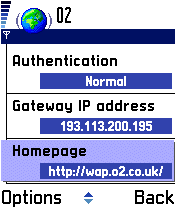
- Enter the settings from the following table
-
Press 'Back' when complete. To access WAP, go to the 'Services' application and go to a WAP site. o2's homepage is http://wap.o2.co.uk/
| Field | Dial-up connection | GPRS connection |
| Connection name | o2 | o2 |
| Data bearer | GSM data | GPRS |
| Dial-up number | +447712 927927 | - |
| Access point name | - | wap.o2.co.uk
(Contract) payandgo.o2.co.uk (PAYG) |
| User name | o2wap | o2wap |
| Prompt password | No | No |
| Password | password | password |
| Authentication | Normal | Normal |
| Gateway IP address | 193.113.200.195 | 193.113.200.195 |
| Data call type | ISDN v.110 | - |
| Maximum data speed | 9600 | - |
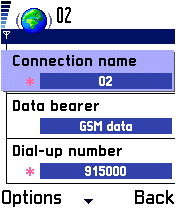
Setting up WAP
For a list of WAP settings for other UK mobile phone operators, see our WAP page
Problems connecting
If you're having problems connecting to WAP, try the following advice:
- In order to use WAP, you must have data services enabled on your account. If you can't connect, contact your network operator (e.g. o2, Orange, Vodafone or T-Mobile), and ask them to ensure that your SIM Card is 'data-enabled'.
- If trying to connect via GPRS, note that this is a different service to standard dial-up WAP access. Again, contact your network operator to ensure GPRS is enabled on your account.
- Still having problems? Double-check your settings are 100% correct. The UK settings for the main network operators can be found on our WAP page. Alternatively, try getting the settings sent to your handset using the Nokia Configurator.
- If you're still having problems, best bet is to ask in our forum with details of handset type and error messages. Alternatively, contact your network operator for help.
For more help, see our Connected? page
Other links:
- For details of setting up WAP for other networks, see our WAP settings page.
- For help with Bluetooth, go to our Bluetooth page.
- To have Wap settings sent directly to your mobile, try the Nokia Configurator
- For help connecting to email, go to the 3650 connectivity page.
- Free WAP? If your network operator doesn't offer you any free WAP usage, you may want to consider moving to another network, such as UK operator O2 online, who offer a free WAP allowance over GPRS.
Bookmark this page:


